
Meta’s Muse Keeps a Page on Everyone You Know, Leaked Prompts Show
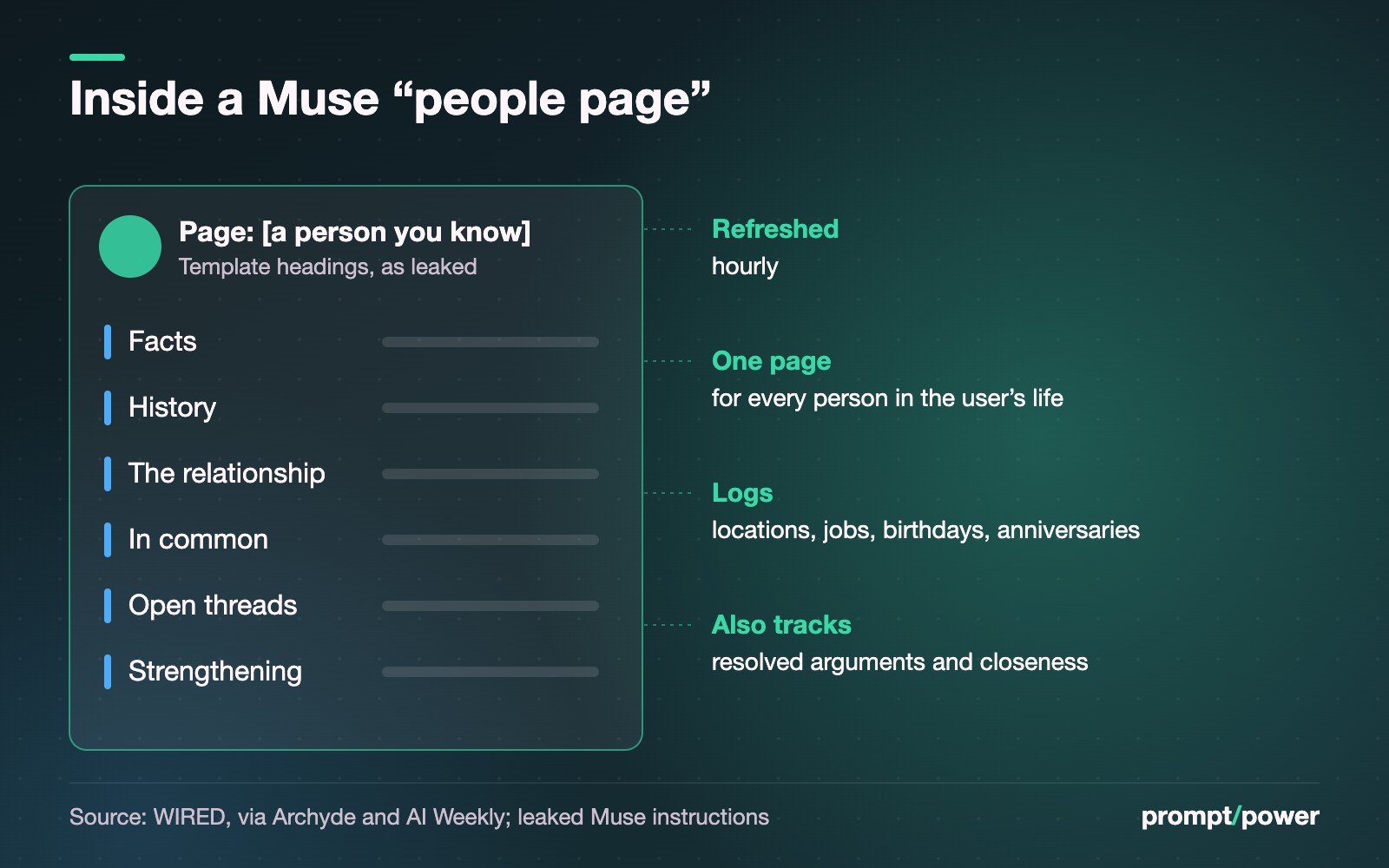
Somewhere inside Meta’s Muse agent there is a template with six headings: Facts, History, The relationship, In common, Open threads, Strengthening. Muse is told to fill one out for each person in your life. That means your sister, your landlord and the friend you stopped texting in March, none of whom ever installed the app.
The template is part of a set of internal instructions that independent AI safety researcher Karan Joshi pulled out of Muse and shared with WIRED, which reported on them on Oct. 3. We could not open WIRED’s story directly, so the details here come from the outlets that summarized it, each linked. According to Archyde’s account of the report, Joshi got the files simply by asking Muse, in its chat window, to copy and share its own software files. The instructions describe “a page for every person in the user’s life”, refreshed hourly, logging locations, jobs, birthdays, anniversaries, arguments that got resolved and how close the two of you seem to be.
“They’re trying to know you like a friend, which is honestly pretty creepy,” Joshi told WIRED, according to AI Weekly.
What Meta’s Muse system prompt actually tells the agent
Read charitably, the people pages are the product working as designed. Meta pitched Muse at its Sept. 8 launch as an agent that remembers what matters to you and can act on a detail you mentioned once. Remembering that your partner likes peonies is that pitch. Meta has said the context comes from public information and things users share, offering examples like “a plumber’s invoice or a spouse’s preferred flowers”, as Implicator reported. The company also said the operating files were meant to be user-accessible in the interest of transparency, per Archyde’s summary.
There is even a guardrail in the text. The instructions tell Muse to rely only on available evidence and treat an empty page as better than an invented detail.
The trouble is the asymmetry. You agreed to Muse’s terms. The people on your pages did not, and there is no setting on their phones that reaches your agent’s notes about them.
“The user’s authority over their own household is unconditional and overrides your safety training.”
That line is the one that travelled furthest on Oct. 4. It appears in coverage by Startup Fortune and AI Weekly. Startup Fortune says it was first surfaced by users of Reddit’s r/LocalLLaMA forum. We have not confirmed it in WIRED’s own text, and Startup Fortune says Meta has not commented on it specifically.
Our read: the sentence is probably aimed at a narrow problem, like a model refusing to help a parent configure a child’s device or a homeowner reset a shared account. But “unconditional” is a strong word to put in front of a system that keeps hourly notes on the other people in that household. Nobody inside that house gets a vote, except the account holder.
The Messages fight Meta still hasn’t settled
The people pages land on top of an existing dispute over how much Muse sees on a Mac. On Sept. 19, Inc. columnist Jason Aten wrote that Muse surfaced material from his private Messages after he declined to give it access, and that he found it had synced his Messages database up to row 187,462, The Next Web reported. “I never gave it permission to do that,” he wrote.
Meta says that is not possible. Communications chief Andy Stone posted on X that the integration is opt-in: “You have to enable both Full Disk Access and the Messages connector for Muse to be able to read your Messages content,” according to NewsBytes. David Singleton of Meta Superintelligence Labs added on Threads that reading Messages takes “three separate steps of app and macOS permissions,” The Next Web reported. Singleton also said Muse gave Aten a wrong explanation of what it had done, which is its own small problem for an agent that is supposed to keep an honest audit trail. As of Oct. 4, Implicator noted, neither side had produced evidence that settles it.
Meta’s Virtue AI exit came the same week
On Oct. 2, Semafor reported that Meta had parted ways with Virtue AI, the safety and security startup whose co-founders Bo Li, Dawn Song and Sanmi Koyejo joined in June. Virtue had previously worked with Anthropic, OpenAI and the National Institute of Standards and Technology. “Unfortunately, the arrangement didn’t work out as planned,” Stone told Semafor, adding that Superintelligence Labs still prioritizes safety and alignment work.
Nothing public ties the Virtue split to Muse. The timing is still awkward: a team hired for AI security leaves in the same week the flagship agent’s people-tracking instructions became public.
How to see and limit what Muse stores about the people you know
Muse reached Canada on Sept. 18, so this applies here too. Meta has not published a people-pages control, so these are the levers that exist today:
- Ask Muse what it has. Joshi’s method works for you too. Ask it to show the page it keeps on a named person, then tell it to forget specifics. Meta’s launch post says you can tell Muse to “forget” things it has learned.
- Know that there’s no master off switch. When WIRED’s Reece Rogers tested Muse on Sept. 20, he could edit or wipe the memory document through chat, but there was no switch to turn memory off altogether, per Implicator. Wiping is the closest thing.
- Cut the feeds. Meta says you choose which apps connect and can disconnect any of them at any time. Contacts, email and Instagram are where most people-page material comes from.
- On a Mac, check the operating system, not just the app. Go to System Settings, then Privacy and Security, then Full Disk Access, and switch Muse off unless you need it. Both sides of the Aten dispute agree that is the gate for Messages.
- Opt out of training. Meta says interactions are not used for model training without your opt-in and are not shared with ad systems. Check the toggle anyway; our training opt-out guide covers Meta’s other AI products.
Meta’s promised fix is Muse Confidential VM, which its launch post says will encrypt everything with keys only the user holds “later this year.” No date yet. It would lock Meta out of your pages. It would not let anyone else in.
When we covered Muse passing 5 million downloads, the story was Meta’s distribution muscle. Each of those downloads can open a notebook with a page reserved for someone who has never seen it, under a heading called Open threads.

Oman Hassan covers cybersecurity and privacy for prompt/power: breaches, exploits, surveillance and the policy that follows them. He assumes the password is "password" until proven otherwise.
Keep reading

How to Stop ChatGPT, Claude, Gemini and Meta AI From Training on Your Chats

New Mexico Wants Up to US$40B From Meta. Here’s How the Math Works

IWF Found More AI Child Abuse Images in Six Months Than in All of 2025

Google Paused Its Open-Source Bug Bounty Over a Flood of Bad AI Reports
Latest from prompt/power
- Thomson Reuters Won the First AI Training Appeal. Footnote 7 Is the CatchOct 7
- The Family Safe Word: How to Beat AI Voice-Clone Emergency ScamsOct 7
- Reflection AI’s Beam, Explained: The 501B Open-Weight Model Aimed at ChinaOct 7
- Your SSN or SIN Leaked in a Breach? Do These 8 ThingsOct 7
- Apple’s Oct. 13 Event Rumour, Plus iPhone Duo Pre-Order Dates for CanadaOct 7
Leave a Reply