OpenAI started rolling out Locked Chats in ChatGPT on Oct. 20, 2026: a way to pull individual conversations out of your regular history and put them behind a four-digit PIN, or Face ID, Touch ID or Android device unlock on phones. It is free on every consumer and work plan except ChatGPT for Healthcare, and it is arriving gradually, so you may not see it yet. The catch is in the fine print. The PIN keeps a chat away from someone holding your unlocked phone. It does not change what OpenAI stores, how long it keeps it, or whether it trains on it.
We read OpenAI’s help centre article on locked chats line by line, and it is far more specific than the launch coverage. It also corrects one detail that has been widely repeated about shared links, which we get to below.
Who gets ChatGPT Locked Chats, and where
Per the help article, Locked Chats is available on Free, Go, Plus, Pro, Business, Enterprise and Edu. ChatGPT for Healthcare is excluded. On a computer you need the new ChatGPT desktop app for macOS or Windows, or the web. The rollout is staged, and OpenAI’s test for whether you have it is simple: open the ••• menu on an eligible chat and look for Lock chat. If it is missing, your account is not in yet. TechCrunch reported the launch on Oct. 20 and noted it may not be live for everyone.
A note on method: we have not tested Locked Chats ourselves. Every step and limit below comes from OpenAI’s documentation, and we will update this guide once we have used it.
How to lock a chat in ChatGPT, step by step
- Open the chat you want to hide. It has to be a normal saved conversation (see the list of exceptions below).
- Tap or click the ••• menu, then Lock chat, then Lock chat again to confirm.
- Create your PIN the first time: four digits, entered twice. The PIN belongs to your OpenAI account, not to a workspace, so it follows you across devices.
- Find it later under Projects > Locked chats. It disappears from regular history, pinned chats and regular search.
- Turn on biometrics (optional). On iPhone, enable Face ID or Touch ID from the Account PIN settings. On Android, choose device unlock when prompted. This only applies to the device you set it on; the PIN stays as the fallback everywhere.
- Change the PIN at Settings > Security and login > Account PIN. You need the current PIN even if you normally use Face ID. Changing it keeps your locked chats.
- Unlock a chat by opening it, then ••• > Unlock chat (just Unlock on iOS). It goes back to your regular history.
Access times out on its own. On web and desktop, it ends when you leave the tab for a while, refresh or close it, and every other tab has to authenticate separately. On iOS and Android, it ends after one minute away from the locked area or one minute in the background. A Lock now button ends access immediately, which is the one to hit before you pass someone your phone.
Forget the PIN and your locked chats are gone
This is the part to read twice. If you reset the PIN (Account PIN > Reset PIN), OpenAI says that permanently deletes every locked chat, any memories stored only inside them, and any files protected only by the old PIN. It cannot be undone, OpenAI Support cannot recover it, and workspace admins cannot reset your PIN or unlock your chats for you. Too many wrong guesses temporarily disables access.
Our read: treat the PIN like a password manager master password. Pick four digits you will remember, not your bank PIN, and write them down somewhere offline if a locked chat holds anything you would hate to lose.
What the PIN protects, and what it doesn’t
OpenAI is unusually direct about the limits. Locking a chat, the help article says, does not create end-to-end encryption or a separate encrypted vault. It does not change OpenAI’s retention period for the chat. It does not change your “Improve the model for everyone” setting; locked chats follow whatever that setting already is. It does not remove anything ChatGPT already remembered. And it does not override workspace policies, safety requirements or legal and compliance obligations.
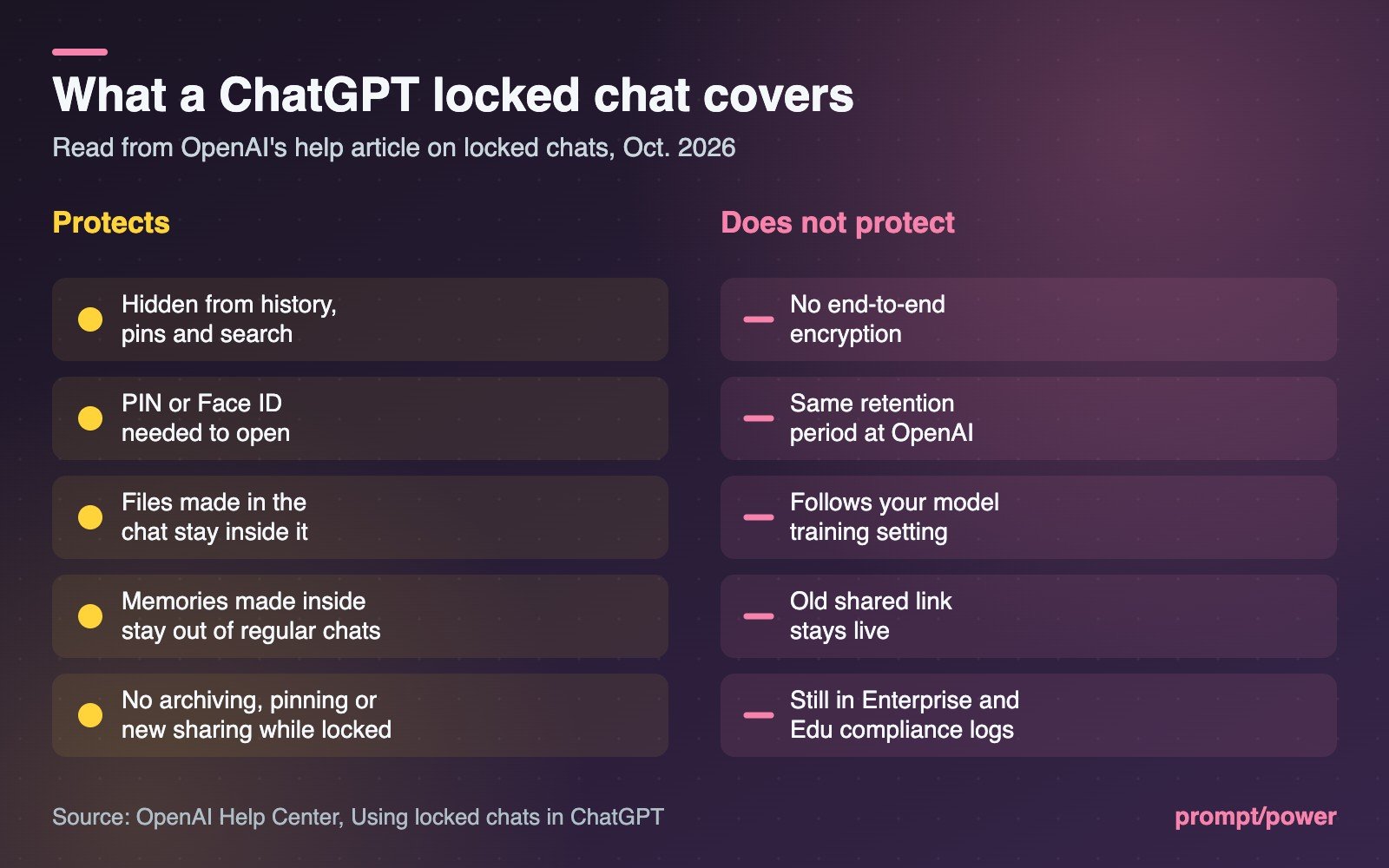
| Locking a chat does | Locking a chat does not |
|---|---|
| Hide it from history, pinned chats and regular search | Add end-to-end encryption or an encrypted vault |
| Require your PIN or biometrics to open it | Shorten how long OpenAI keeps the chat |
| Protect files uploaded or created in that chat, and hide them from Space | Opt the chat out of model training |
| Keep memories made inside it out of your regular chats | Erase what ChatGPT already remembered |
| Block archiving, pinning, moving and new sharing until unlocked | Kill a shared link the chat already had |
| Time out after a minute in the background on phones | Hide it from Enterprise and Edu compliance logs |
Three rows deserve a closer look.
Shared links. Several launch reports said chats with shared links cannot be locked. The help article says something narrower: chats created from a shared link cannot be locked, but a chat that already has a shared link can be. Lock it and the link is not deleted. New messages simply stop being added to the shared version. If you once shared a conversation and now regret it, locking will not undo that. Delete the shared link separately.
Memory runs one way. Launch coverage described locked chats as having separate memory. That is half the picture. If Memory is on, locked chats can still use your regular Memory, and new messages can be remembered for other locked chats, but memories stored only in locked chats do not carry into regular ones. Unlocking a chat does not automatically add those memories back either. If your workspace turns Memory off, locked chats cannot use or create memories at all.
Your employer can still see it. In Enterprise and Edu workspaces, OpenAI says locked chats still appear in the conversation logs available through the OpenAI Compliance Platform, and admins cannot switch the feature off through a workspace setting. Lock is a screen-level privacy tool, not a way to hide a conversation from IT.
One more limit is obvious once stated: anyone who can open a locked chat can copy what is in it.
Chats you can’t lock
- Temporary chats and archived chats
- Group chats
- Chats in the earlier Health experience
- Chats created from a shared link
- Chats with scheduled tasks (delete the task first, including paused ones), chats tied to background tasks, and chats with meeting recordings
- Chats whose responses are saved as project sources
- Codex conversations, including cloud ones, and local Work conversations
Voice works in locked chats on web, iOS and Android, but not in the desktop app. You also cannot search across all your locked chats at once; on iOS, Find works inside an open one.
What to do with it
Use Locked Chats for the problem it actually solves: a partner, a kid or a coworker scrolling your ChatGPT sidebar. If a household device is shared with a teenager, our parent’s guide to AI chatbot controls covers the settings that go further. If your worry is OpenAI itself, locking does nothing, and the control you want is the training opt-out, covered in our guide to stopping ChatGPT, Claude, Gemini and Meta from training on your chats. Pair any of this with a strong account sign-in; passkeys are the easiest upgrade. More app privacy coverage lives on our consumer apps page.
Resetting the PIN permanently deletes every locked chat, and OpenAI Support cannot recover it.
The detail that best captures the trade-off sits in the files section of OpenAI’s article. A file uploaded inside a locked chat is hidden from Space while the chat is locked. A file you added to Space from anywhere else stays right there in plain view.

Lauren Smith covers consumer apps and services for prompt/power: streaming, subscriptions, e-commerce and everyday tech worth your money. She keeps a running tally of every free trial that quietly turned into a subscription.
Keep reading




Latest from prompt/power
- Westminster’s AI Fortnight: Ofcom Grilled, Bot Bill Slips to Nov. 27Oct 23
- Blink Mini 4K+ Is US$79.99. Two Years of Its AI Plan Costs MoreOct 23
- Netflix Cuts Its 2026 Ad Forecast to US$2.7B as Price Hikes HoldOct 22
- Anthropic’s AI Safety Bill, Explained: The 50-Death Test and Who DecidesOct 22
- WhatsApp’s Hidden AI Notes Said Don’t Suggest a Regulator. Here’s YoursOct 22
Leave a Reply