
The string to look for is svc-telemetry. That’s the comment on an SSH public key that a doctored copy of Anthropic’s Claude Code extension tried to add to the authorized_keys file of anyone who installed or auto-updated it through Cursor on Oct. 29. If those 13 characters are in your file, someone else had standing permission to log in to your machine.
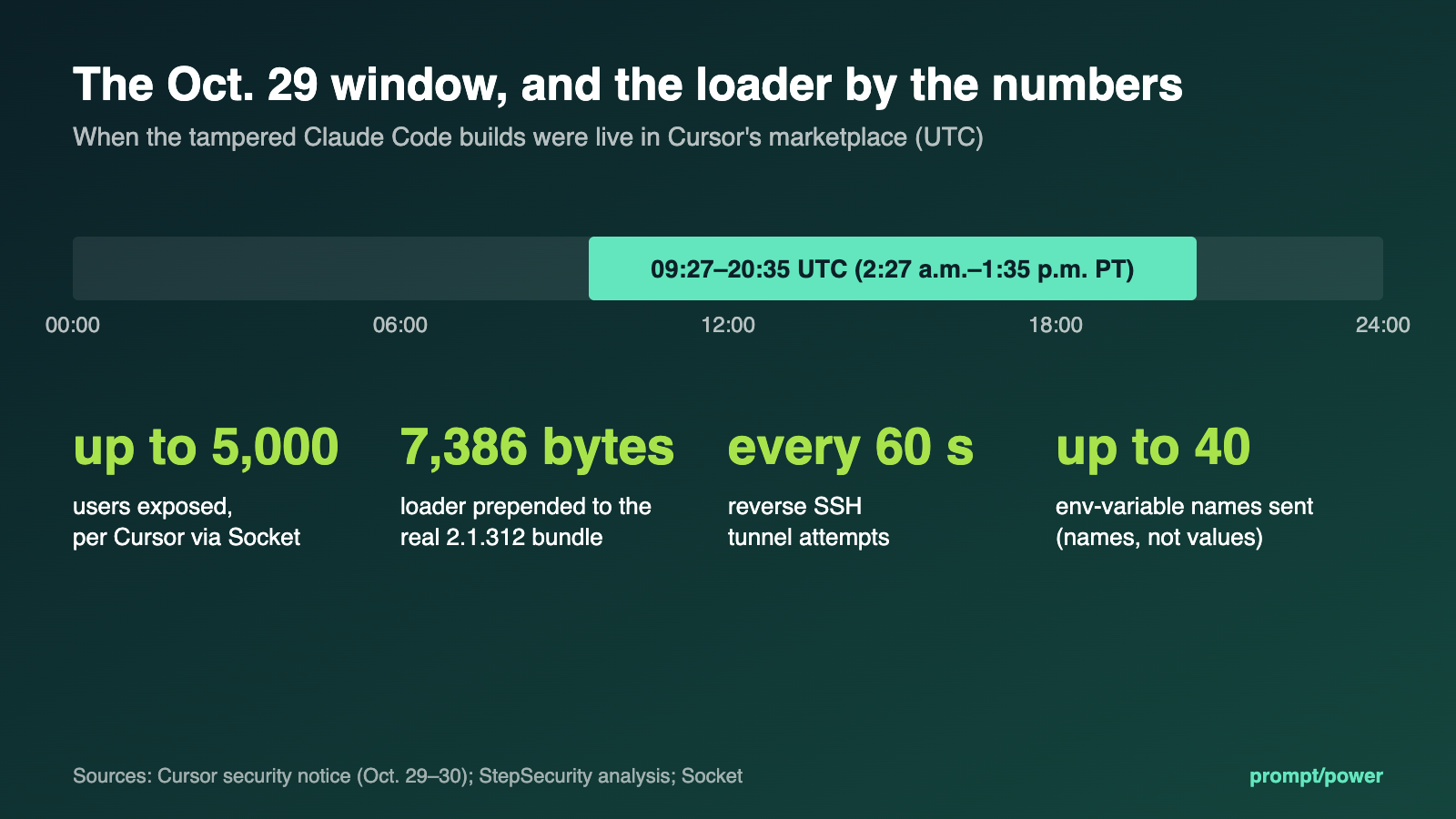
The company that ran the store has confirmed it. Cursor’s security notice, published Oct. 29 and updated Oct. 30, says versions 2.1.312 and 2.1.313 of Anthropic.claude-code in the Cursor VS Code Extension Marketplace were malicious builds that Anthropic did not develop. They were available for macOS and Windows from about 2:27 a.m. to 1:35 p.m. PT. The endpoint security firm Phorion published a technical advisory on Oct. 30, and The Register credits it with spotting the tampered update. Cursor put exposure at up to 5,000 users, according to Socket; researcher Kevin Beaumont’s own estimate, cited by SecurityWeek, comes out similar.
Two things in the early coverage need fixing. This wasn’t a lookalike extension with a misspelled name. Morphisec notes that it was published under the extension’s legitimate publisher identity, which is why the usual sniff test didn’t help. Nor was it an Open VSX problem, whatever several first reports said. Socket went through Open VSX’s public change feed and found no 2.1.313 publish or removal event in the window it reviewed, and StepSecurity downloaded the 2.1.312 build Open VSX was serving and found it clean.
Anthropic’s Felix Rieseberg wrote on Hacker News: “We’re working with Cursor on this incident, but it wasn’t a compromise of Anthropic’s systems or employee laptops.” Neither company has said how the attacker got publishing access to Cursor’s marketplace. Our read: that open question matters more than any IOC list.
What the tampered build did
StepSecurity’s static analysis calls the tampering “a pure prepend”: a 7,386-byte loader stuck in front of an otherwise byte-identical copy of the real 2.1.312 bundle. It ran when Node loaded the file. You didn’t have to open a Claude chat or click anything.
Installing it was enough.
“The loader’s entire capability is persistent SSH ingress plus a reconnaissance report.” (StepSecurity)
It worked in stages. First it collected your hostname, username, OS, home directory, global Git email and public IP, plus the names (not the values) of up to 40 environment variables matching patterns like KEY, TOKEN and SECRET. It appended the svc-telemetry key to ~/.ssh/authorized_keys and tried to turn on the local SSH server. After that it tried every 60 seconds to open a reverse SSH tunnel to 134.209.82.225, and sent a report of everything it had done to port 8099 on the same address.
For persistence, Cursor’s IOC list shows a LaunchAgent on macOS disguised as an Apple service (com.apple.sysmond) and a scheduled task called SysMon on Windows, with a sysmon.cmd file in the Startup folder as a fallback. The code also carries a cron @reboot entry for Linux, though Cursor lists only Mac and Windows packages as affected.
Some of it failed. Turning on SSH usually needed admin rights, Cursor says, and Phorion found a macOS bug that skipped that step entirely when the malware wasn’t running as root. Cursor also says it worked with the hosting provider to take the attacker’s server offline. But the key and the startup job still landed, and the recon report still went out. Hence Cursor’s warning, quoted by SecurityWeek, that uninstalling the extension “may not be sufficient.”
Checking a Mac or Linux machine
How we built these: every path, string and hash below comes from Cursor’s notice and StepSecurity’s IOC table. Phorion gives the install folder as a dot-folder named for your editor, then extensions, then anthropic.claude-code-2.1.312-darwin-arm64; for Cursor on Mac and Linux, that dot-folder is ~/.cursor. We ran the shell commands on a Linux machine against a mock home folder seeded with the published strings, to confirm each check fires when it should and stays quiet when it shouldn’t. We had no live sample and didn’t test on infected hardware. Every command only reads.
Open Terminal and run these one at a time. “No such file” means the thing isn’t there, which is what you want.
See which Claude Code versions Cursor has on disk. A folder named 2.1.312 or 2.1.313 means look closer; a version number alone doesn’t prove infection.
ls -d ~/.cursor/extensions/anthropic.claude-code-*
Search those folders for the attacker’s IP or key comment inside extension.js. Any filename printed is a hit.
grep -rlE ‘134\.209\.82\.225|svc-telemetry’ ~/.cursor/extensions/anthropic.claude-code-*/ –include=extension.js
Check for the planted key. This one matters most, because the key stays even after you update the extension.
grep -n ‘svc-telemetry’ ~/.ssh/authorized_keys
Look for the dropped scripts and the fake Apple LaunchAgent.
ls -la ~/.config/.smt ~/.config/.smtk ~/Library/LaunchAgents/com.apple.sysmond.plist
launchctl list | grep sysmond
On Linux, check cron instead of launchctl.
crontab -l | grep -F ‘.smt’
Look for a tunnel process that’s still running.
ps aux | grep -E ‘[s]sh -N -R|[a]utossh’
To compare hashes, run shasum -a 256 on the extension.js inside any 2.1.312 or 2.1.313 folder (sha256sum on Linux). The malicious file’s SHA-256 is ecb58cb29078d9646ad1dcdbe51526f2d9cfea06be5fb2ab183e8ecc3ab6bf15, according to Cursor’s IOC table, which lists the same extension.js hash for all four bad packages. StepSecurity repeats it.
On Windows, in PowerShell
The same checks, translated. They come from the same IOC list, but unlike the shell versions we haven’t run them on a Windows machine, so read any error before trusting a blank result.
Get-ChildItem “$env:USERPROFILE\.cursor\extensions” -Directory -Filter ‘anthropic.claude-code-*’
Select-String -Path “$env:USERPROFILE\.ssh\authorized_keys”,”C:\ProgramData\ssh\administrators_authorized_keys” -Pattern ‘svc-telemetry’ -ErrorAction SilentlyContinue
Get-ScheduledTask -TaskName SysMon -ErrorAction SilentlyContinue
Test-Path “$env:APPDATA\Microsoft\Windows\Start Menu\Programs\Startup\sysmon.cmd”
Test-Path “$env:USERPROFILE\.config\smt.cmd”
The second path in the Select-String line is the admin-level key file, which Cursor’s own Windows check covers too. A True from either Test-Path, or any output from the other three, counts as a hit.
What to do
1. If every check comes back empty, and you didn’t install or update the extension in Cursor between 09:27 and 20:35 UTC on Oct. 29, you’ve cleared the checks StepSecurity recommends. Update to the current release and move on.
2. If anything hits, take the machine off the network before you clean it. Cursor and Morphisec both put isolation first.
3. Run Cursor’s cleanup script, linked from the security notice: remediate-macos.sh as your normal user (not root), or remediate-windows.ps1 from an elevated PowerShell. Cursor says the scripts remove the extension, the persistence, the tunnel processes and the attacker’s key, and exit with an error if anything’s left. Read the script before you run it. Rebuilding the machine is the other option Cursor raises.
4. From a different, trusted machine, rotate what the affected one could reach: SSH keys, Git and cloud credentials, API tokens. The malware sent only the names of your secrets, but Cursor warns that doesn’t rule out the attacker reaching credentials later through the tunnel.
5. If you manage a team, search endpoint and network logs for 134.209.82.225, outbound SSH from developer laptops, and the svc-telemetry string. Morphisec’s broader point applies here: approving a tool doesn’t mean you control what it can do once it runs, such as writing to authorized_keys or creating scheduled tasks.
The version number tells you one more thing. After the incident, Anthropic skipped 2.1.313 on its own channels and went straight to 2.1.314. Anthropic also confirmed, according to StepSecurity, that 2.1.313 was never published to Open VSX or Microsoft’s marketplace. If you have a folder with that number, there’s only one place it could have come from.


More from prompt/power: How to lock down AI agents · Hackers posed as Anthropic staff to phish AI policy experts · Ledger wallet implant: what to do

Lauren Smith covers consumer apps and services for prompt/power: streaming, subscriptions, e-commerce and everyday tech worth your money. She keeps a running tally of every free trial that quietly turned into a subscription.
Keep reading

Cohere Caught Qwen Trying a Beijing Upload. How to Lock Down AI Agents

Cloudflare’s AI Leaked Other Customers’ Data in 155 Replies. What to Check

TD, RBC and BMO Block AI Agents From Bank Accounts: What Breaks, Who Pays

ICO’s AI Agents Call for Evidence: What It Asks and How to Respond
Latest from prompt/power
- Jensen Huang’s resignation: what Nvidia’s 8-K says and leaves outNov 16
- Quebecor’s offer for TELUS says nothing about TELUS’s AI factories. Here’s what’s at stakeNov 16
- Can an AI chatbot be your therapist? Where the rules stand in the U.S., Canada and beyondNov 16
- ChatGPT, Claude, Gemini and Copilot: what every AI plan costs in CanadaNov 16
- Nvidia’s first earnings without Jensen Huang: the numbers to watch on TuesdayNov 16
Leave a Reply