
Google started rolling out Personal Intelligence for Gemini on Android Auto on Oct. 20, so the assistant in your car can now draw on your Gmail, Google Calendar, Google Photos, Maps, YouTube and Search history to answer requests like “Take me to my doctor’s appointment.” The fine print is in a footnote to Google’s announcement: the feature is for personal Google accounts held by people 18 and older “globally” excluding the European Economic Area, Switzerland, the United Kingdom and Nigeria. That puts drivers in the US and Canada in, and UK drivers out. Cars with Google built-in get it “in the coming months.” Google is releasing it gradually, so it may not show up on your phone yet.
We checked Google’s announcement against its Personal Intelligence help page to work out who qualifies, what it costs and which settings control what Gemini reads while you drive. Here is what the pages confirm, and what they leave unsaid.
Who can use Gemini Personal Intelligence on Android Auto
Gemini itself is “now available globally on Android Auto and cars with Google built-in,” Google says. Personal Intelligence, the layer that connects your Google apps, has narrower rules.
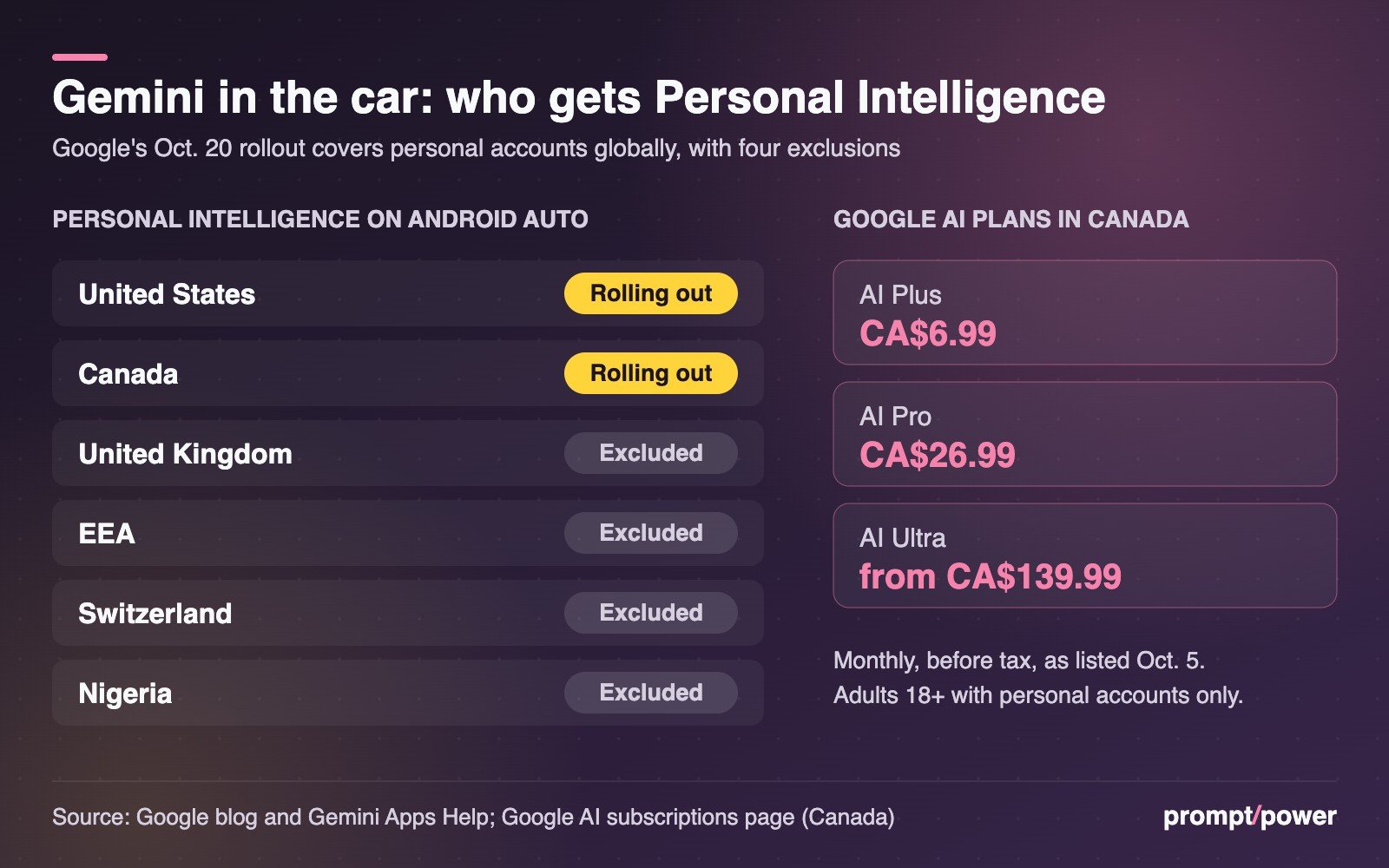
| Market | Personal Intelligence on Android Auto | What Google’s pages say |
|---|---|---|
| United States | Yes, rolling out from Oct. 20 | Launched in the US in January for paying subscribers; expanded to all US users in March |
| Canada | Yes, rolling out from Oct. 20 | Not on the exclusion list; paid plans got it April 14, free users “coming soon” at that point |
| United Kingdom | No | Excluded |
| EEA and Switzerland | No | Excluded |
The US history is on record. Google introduced Personal Intelligence on Jan. 14 as a beta for Google AI Pro and Ultra subscribers in the US, and TechCrunch reported in March that it was expanding to all US users. On April 14, Google’s Gemini account posted on X that Ultra, Pro and Plus subscribers “around the world” could use it, “with a rollout to free users coming soon.” Wifi Hifi reported the same day that it was live for those plans in Canada.
What we couldn’t confirm is whether free accounts in Canada have it now. The help page lists the requirements but says nothing about plans. If you’re on the free tier in Canada, the simplest test is to open the Gemini app and look for the opt-in card described below.
The other requirements, from the help page:
- You must “be 18 or over” and signed in with a personal Google Account. Work, school and supervised accounts are excluded, so your employer’s Gmail won’t feed your car.
- Keep Activity must be on. To use other Google apps, Web & App Activity, YouTube History and smart features in other Google products must be on too.
- Google Photos works only in “certain countries and territories,” and Google Wallet only in the US.
Google AI plan prices in Canada and the US
A paid plan is the surest way in outside the US. These are the monthly prices on Google’s Canadian subscriptions page as of our Oct. 5 check, when we covered the changes to Gemini’s free tier.
| Plan | US price | Canada price |
|---|---|---|
| Google AI Plus | US$4.99 | CA$6.99 |
| Google AI Pro | US$19.99 | CA$26.99 |
| Google AI Ultra | From US$99.99 | From CA$139.99 |
Prices before tax. Check the page before you subscribe: Google changed what each plan includes on Oct. 9. In the UK, paying for a plan doesn’t unlock Personal Intelligence at all.
How to turn on Personal Intelligence before you drive
Set this up on your phone, parked. Android Auto runs from the phone, so the in-car Gemini uses the same account and settings.
- Open the Gemini app on your phone, or go to gemini.google.com.
- Tap Get started on the Personal Intelligence opt-in card. If there’s no card, your account isn’t eligible yet or the rollout hasn’t reached you.
- Choose Connect all, Choose apps, or Don’t connect. Choose apps is the better default. Calendar and Gmail drive most of the useful car requests; Photos and YouTube are optional.
- Check the activity settings listed above. If Web & App Activity is off, the app connections won’t work.
- Connect your phone to the car and start Android Auto. Google says Personal Intelligence on Android Auto is rolling out from Oct. 20, so give it time if Gemini’s answers aren’t personal yet.
Starting Personal Intelligence also resets your old setup. Google’s January post warns: “If you start the process of turning on Personal Intelligence, old connections will be turned off.”
To change what’s connected later, in the mobile app go to Menu, then your profile picture, then Personal Intelligence, then Connected Apps. On the web it’s Menu, Settings & help, Personal Intelligence, Connected Apps.
What to ask Gemini in the car
Google’s examples are the best guide to what it has tested. Each one leans on a different app:
- “What’s my flight gate? And is my flight on time?” (Gmail confirmations)
- “Take me to my doctor’s appointment.” (Calendar)
- “Find the car wash from the photo I took last week and navigate there.” (Photos)
- “Find me an indoor restaurant along my route that matches my usual vibe.” (Maps and Search history)
- “Take me to the coffee shop we were talking about yesterday.” (your earlier Gemini chats)
Without Personal Intelligence, Google says, navigation, music, calls and general questions still work. The answers just aren’t tailored to you.
Privacy settings that control what Gemini reads while you drive
“Your apps aren’t connected until you choose to turn it on, and you can turn it off anytime in your Gemini settings,” Google says. A few details matter more in a car than at a desk.
- It talks out loud. Our read: a spoken answer about a medical appointment or a hotel booking is heard by everyone in the car. If you often drive with passengers, connect fewer apps.
- One chat at a time. You can turn Personal Intelligence off for a single chat from Tools in the text box. New chats start with it on again.
- Off isn’t erased. The help page says chats stay saved to Gemini Apps Activity even with Personal Intelligence off, and deletions in a connected app can take days to reach Gemini.
- Training. “Gemini doesn’t train directly on your Gmail inbox or Google Photos library,” Google says, but it does train on “limited info, like specific prompts in Gemini and the model’s responses,” after filtering personal data. Our guide to stopping AI chatbots from training on your chats shows how to limit that.
- Google built-in cars. When the feature reaches them, Google says they “only share personal responses when you’re in the car with your phone connected.”
Honest caveats before you rely on it
Google says it has tested Personal Intelligence “extensively to minimize mistakes, but we haven’t eliminated them.” It warns of “over-personalization,” where Gemini links things that aren’t related, and says the assistant can struggle with timing. On the road, that means confirming a destination before you follow it. For more on getting cleaner answers from Google’s AI, see our guide to AI Mode and plain search results, and more in gadgets.
The launch was widely reported, but the country list lives only in the footnote to Google’s post. It runs to one sentence. For a driver in Manchester, three words in it settle the whole question: “the United Kingdom.”

Yuna Park covers mobile and gadgets for prompt/power: phones, accessories, consumer electronics and the supply chains behind them. Her favourite test for any new phone: would you notice if someone swapped it for last year's?
Keep reading



Latest from prompt/power
- Jensen Huang’s resignation: what Nvidia’s 8-K says and leaves outNov 16
- Quebecor’s offer for TELUS says nothing about TELUS’s AI factories. Here’s what’s at stakeNov 16
- Can an AI chatbot be your therapist? Where the rules stand in the U.S., Canada and beyondNov 16
- ChatGPT, Claude, Gemini and Copilot: what every AI plan costs in CanadaNov 16
- Nvidia’s first earnings without Jensen Huang: the numbers to watch on TuesdayNov 16
Leave a Reply