
Claude for Google Workspace: How to Set It Up and When to Let It Edit
There is a selector at the bottom of Claude’s new Google Docs sidebar, and it decides almost everything about how risky the tool is. Leave it on the default, “Ask before edits,” and Claude describes each change in plain language and waits for you to click Allow. Flip it to “Accept all edits” and it works through your document, spreadsheet or deck on its own.
Anthropic launched the Claude for Google Workspace add-on as a public beta on Oct. 6, alongside beta connectors that let the main Claude app create and edit Google files from a chat. That puts Claude inside the apps where Google already sells Gemini. Here is how to set it up, what each mode lets Claude do, and the limits worth knowing before you point it at a file other people depend on.
What Claude does in Google Docs, Sheets and Slides
The add-on opens as a sidebar inside the file. According to Anthropic’s announcement, it does different work in each app:
- Docs: edits a sentence or restyles a heading in place while keeping the surrounding formatting. For bigger rewrites it can propose suggestion cards you apply or dismiss.
- Sheets: writes formulas, builds pivot tables and native charts, and adds tabs. For joins or data cleaning it can run Python on a range and write the results back.
- Slides: builds slides from the deck’s existing layouts and theme, then checks for overlapping or off-slide elements and hard-to-read text.
The sidebar carries the same models, connectors and saved skills you have in Claude itself, so a team can save a repeated workflow, such as a monthly variance summary, and run it the same way in every file. You can also attach PDF, CSV or Office reference files to the sidebar, Anthropic’s product page says.
Who can use it and what it costs
The add-on is available on every paid Claude plan: Pro, Max, Team and Enterprise. Free accounts are left out. It runs in Chrome, Edge and Safari; Anthropic’s help centre says Firefox is not supported. Current U.S. prices from Claude’s pricing page, with approximate Canadian conversions:
| Plan | Billed monthly | Billed annually |
|---|---|---|
| Pro | US$20/month (about CA$28) | US$17/month, US$200 up front (about CA$278) |
| Max | From US$100/month (about CA$139) | Monthly only |
| Team, standard seat | US$25/seat (about CA$35) | US$20/seat (about CA$28) |
| Enterprise | n/a | US$20/seat plus usage at API rates (about CA$28) |
Your Google account also has to be allowed to install Marketplace apps. That is usually fine on a personal Gmail account and often blocked on a work one.
How to install the Claude add-on for Google Workspace
The steps below follow Anthropic’s help centre article for the add-on:
- Open the Claude listing in the Google Workspace Marketplace and click Install. Choose your Google account and click Continue. One install covers Docs, Sheets and Slides.
- Reload any Google files you already had open.
- In a Doc, Sheet or Slides file, go to Extensions › Claude › Open Claude.
- Approve the two permissions Google shows on first use.
- Sign in with your Claude account in the sidebar, then switch on any connectors you want.
- Check the edit-mode selector at the bottom of the sidebar before you ask for anything.
If the Install button is greyed out or you see “This application is not allowed by your administrator,” a Workspace admin has to allowlist Claude or install it for you. Admins do that from the listing with Admin install, choosing a whole domain or selected groups. To pull it later, they go to Apps › Google Workspace Marketplace apps › Apps list in the Google Admin console, select Claude and click Uninstall app.
Ask before edits vs. Accept all edits
This is the setting that matters, and the two modes carry different risks.
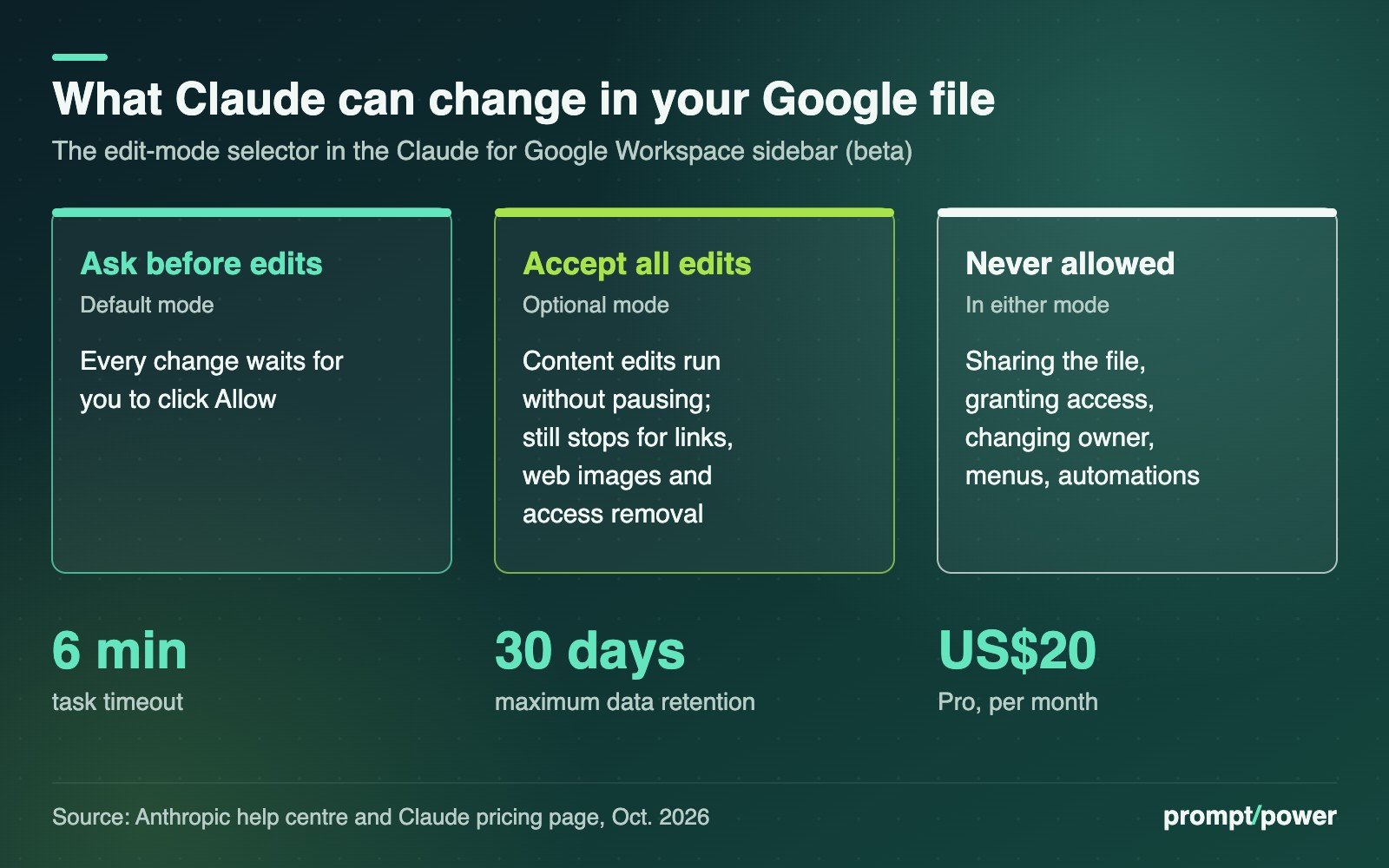
Ask before edits (the default) shows each action as an approval card. It is slower, and on a 40-tab financial model you may click Allow a lot. It is also the only mode in which you see every change before it lands. Note one subtlety in Docs: the help centre says Claude’s edits are direct, and it cannot accept or reject Google’s own suggestions. If you want reviewable changes, ask Claude to propose text changes as cards.
Accept all edits lets Claude make ordinary content edits without pausing. It still stops for anything Anthropic flags for security review: adding links, inserting images from web addresses and removing anyone’s access. Some actions are never allowed in either mode, including sharing the file, granting access, changing ownership, creating menus or automations, and loading arbitrary web pages.
That means a prompt-injection attack hidden in a pasted document can’t simply share your file with a stranger. What Accept all edits can do is rewrite a lot of content quickly. Our advice: use it on your own drafts or on a copy, and keep Ask before edits for shared files, live budgets and anything a colleague is also editing. Anthropic’s own connector documentation says Claude “re-reads the current content before each change, but in a busy file, check the result.”
Editing Google files from the Claude app
The second half of the launch runs the other way. With the beta connectors switched on, you can paste a Google Sheets link into a Claude chat and ask it to reorganize the data, or ask Claude to turn your notes into a new presentation, Android Authority reported.
To turn them on, per Anthropic’s connector help page: click the + in the chat box, hover over Connectors, and toggle on Google Docs, Sheets and Slides. On Team and Enterprise plans, an Owner or Primary Owner has to enable them for the organization first. If Google blocks the app, a Workspace admin can mark it trusted under Security › Access and data control › API controls › Manage third-party app access at admin.google.com, then wait about 15 minutes.
Be clear about the scope you are granting. Claude can reach any file your Drive permissions allow, not just the one in front of you. Reworked reported that the connector requests full read, write and delete access by default, with no visible option to narrow it at the start, though Claude still asks before acting. Live editing in a side pane works only in Chrome on the web or in Claude Desktop with its built-in browser on.
Privacy rules and the beta’s rough edges
Anthropic says it does not train on content from the add-on and deletes inputs and outputs within 30 days. Pro and Max users fall under the consumer terms; Team and Enterprise under the commercial terms and data processing addendum. The add-on doesn’t support zero data retention or HIPAA-covered use, and Anthropic says not to use it with protected health information. Chat history is stored locally in your browser per file, so it vanishes in another browser, a private window or a copy of the file. (For the separate question of chat training settings, see our guide to stopping ChatGPT, Claude, Gemini and Meta AI from training on your chats.)
The help centre lists the beta’s limits plainly:
- The sidebar must stay open or the task stops, and operations time out after six minutes. Break big jobs into smaller ones.
- In Docs, the add-on can’t read, reply to or resolve comments, and can’t create or reorder tabs.
- In Sheets, Connected Sheets (BigQuery) tabs are off limits until extracted to a regular tab.
- In Slides, charts Claude creates are static images, not linked charts.
Claude or Gemini in Google Workspace?
Gemini is already built into Docs, Sheets and Slides, Google’s “home turf,” as Android Authority put it. If your company pays for Gemini through Workspace, you don’t need a second subscription to get a sidebar. The case for Claude is narrower: you already pay for it, you have saved skills and connectors you want inside your files, or your team prefers its writing and spreadsheet work. Anthropic is also targeting the enterprise buyer directly, carrying its Compliance API, customer-managed encryption keys and OpenTelemetry audit export over to the add-on for Enterprise customers.
What to do: install it on a personal account first, make a copy of a real spreadsheet, and give Claude a job in Accept all edits mode. Then open the version history. Every change it made will be sitting there, timestamped, and you will know in about six minutes whether you trust it with the original.

David Mensah covers software and platforms for prompt/power: apps, browsers, developer tools and the open web. He firmly believes every "simple" settings menu is hiding a second, worse settings menu.
Keep reading




Latest from prompt/power
- National Medal of Science Goes to Musk, Brin, Huang and Su. Nvidia Pledged US$1BOct 10
- TikTok Placebo Safety Test: New York Says Teens Got a Fake Feed ResetOct 10
- Waymo Takes Its First Loan, US$5 Billion, as Robotaxis Head OverseasOct 10
- Claude Haiku 5.5 Price: 90% Cheaper Until Your Prompt Hits 100K TokensOct 10
- Bell, Virgin, Public Mobile Plan Changes: The New Canadian Price ListOct 10
Leave a Reply