Google AI Edge Foresight Takes Mac Meeting Notes Offline. How It Works
Type a scrap like “q4 budget??” during a call, and Google’s new Mac app is built to turn it into a proper note, filled in from what was actually said in the meeting. That is the trick Google is showing off in Foresight. The part it wants you to notice is that the note gets written without the audio ever leaving your laptop.
Google released Google AI Edge Foresight on Oct. 6 alongside a new on-device model, EmbeddingGemma 2. In its developer blog announcement, Google calls Foresight “an experimental app that brings a context-aware meeting companion directly to your device,” and says “your sensitive data never leaves your device.” It is free, Mac-only, and pitched squarely at people who would like an AI note-taker but do not want their meetings sitting on someone else’s server.
Here is what it does, what it actually runs, how to try it from Canada, and where it falls short of the cloud tools most offices already pay for.
Google AI Edge Foresight: what Google released on Oct. 6
Foresight listens to your microphone and your Mac’s system audio, which is why Google says it works “out-of-the-box with any meeting platform, even completely offline.” There is no bot joining your Zoom call and no Meet integration to switch on. If sound comes out of your speakers or into your mic, Foresight can transcribe it, according to Notebookcheck’s summary of Google’s materials.
Google describes three main jobs in the announcement:
- Note enhancement. You jot shorthand bullets during the meeting, and Foresight expands them using the live transcript.
- Search across your stuff. You can point it at reference material, and it retrieves images, documents, transcripts and notes from a plain-language question.
- Live answers. When it detects a question being asked in the meeting, it drafts an answer from the transcript and your files.
Sources can include local folders, Google Drive, reference material and calendar data, and the app reads PDFs, Google Docs, Microsoft Office files, plain text, Markdown and web bookmarks, iThinkDifferent reported. A chat window lets you ask questions of everything you have indexed, 9to5Google reported, and iThinkDifferent says Live Assistance surfaces context cards with citations when a file relates to what is being discussed.
Android Authority’s Akshay Gangwar tried it in a mock meeting and reported that it turned his bullets into notes quickly and answered detected questions from the transcript. That was one informal test, not a real meeting with crosstalk and accents, and it is the only hands-on account we found.
What runs on your Mac, and what Google hasn’t said
The headline model is a little misleading. EmbeddingGemma 2 is an embedding model: it turns text, images, video frames and audio into numbers so the app can find related material, and it does not write prose. Google’s post says Foresight is powered by “EmbeddingGemma 2 and Gemma 4 models,” which means a Gemma 4 language model is doing the writing and answering, while EmbeddingGemma 2 handles the retrieval.
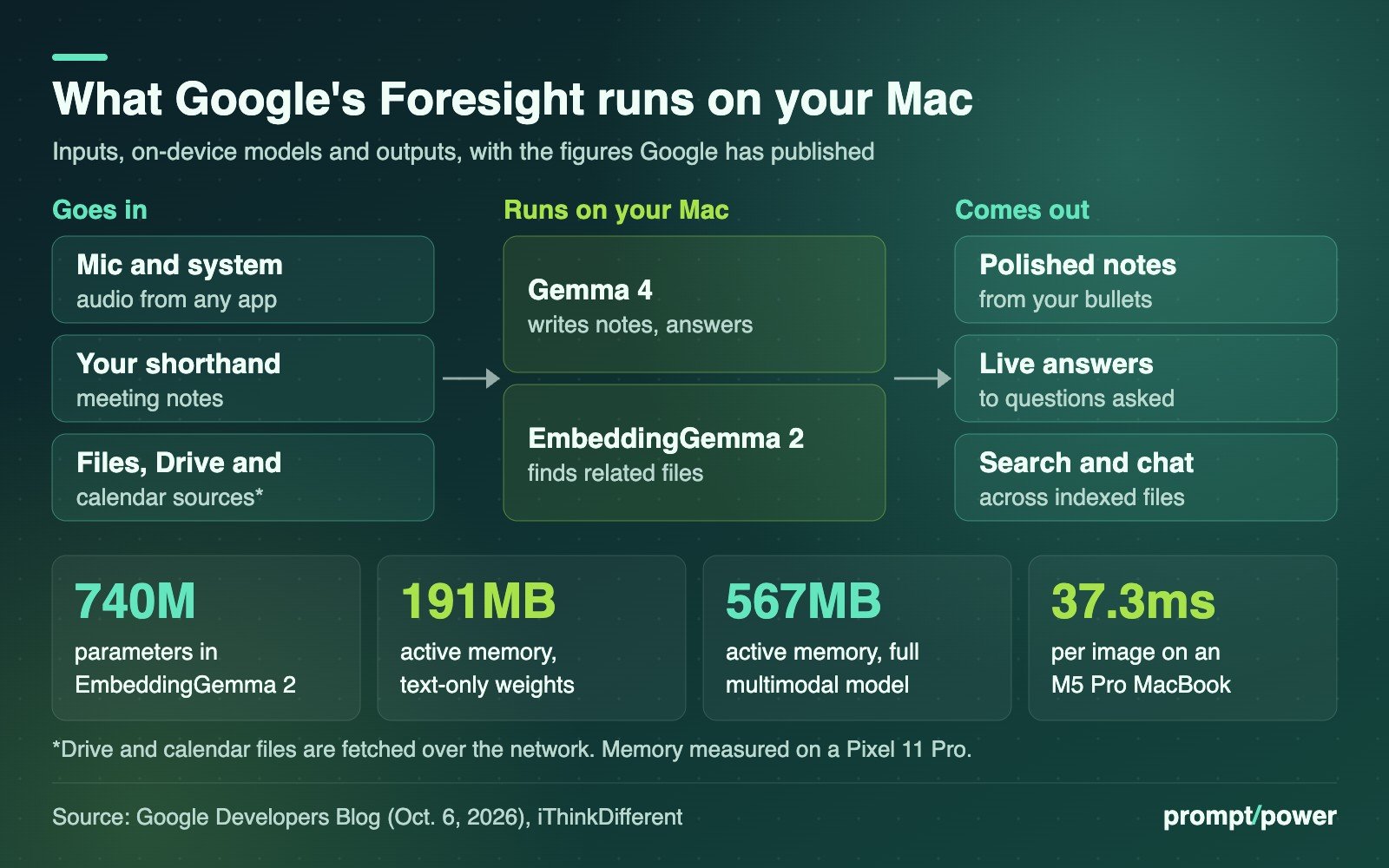
The embedding model is small by current standards. Google gives it a “compact 740M parameter footprint” and says the quantized version uses about 191MB of active memory for text-only weights and about 567MB for the full multimodal model, measured on a Pixel 11 Pro, according to the developer post. On a MacBook with an M5 Pro, Google says it can embed an image in about 37.3 milliseconds.
What Google has not published, as far as we could find:
- Mac requirements. No minimum macOS version, RAM or storage figure appears in the announcement. iThinkDifferent says Google describes the app as optimized for Apple silicon, and Android Authority says it runs on Apple silicon Macs. If you are on an Intel Mac, assume it will not work.
- The transcription model. None of the coverage, and none of Google’s materials we read, names the speech-to-text model.
- Language support. Notebookcheck notes that Google has not said how well transcription handles non-English meetings. For a bilingual office in Montreal or Ottawa, that is the first thing to test.
Our read on “never leaves your device”: it holds for the audio, the transcript and the inference. It cannot fully hold for sources you choose to connect. Pulling files from Google Drive or reading your calendar means fetching them over the network, even if the processing then happens locally. If the point is zero network contact, index local folders only and turn off Wi-Fi to check.
How to try Foresight on a Mac in Canada
- Download it from Google’s developer site. The installer is on Google’s AI Edge Foresight page, not the Mac App Store. Android Authority says the app is free.
- Let it fetch the models. On first launch, the app takes about a minute to download its on-device models, per Android Authority. After that, it should work offline.
- Grant audio access. Because it captures your microphone and system audio, expect macOS to ask for microphone and screen or audio recording permissions under System Settings, Privacy and Security.
- Add knowledge sources. Start with one project folder rather than your whole Documents directory, so you can judge whether its answers cite the right files.
- Run a test call first. Play a recorded meeting or a podcast through your speakers, take shorthand notes, and compare what Foresight writes against what was said.
On Canadian availability: Google’s announcement lists no country restrictions, and because the app is a direct download rather than an App Store listing, there is no store region to block it. We could not test the download ourselves, so treat that as likely rather than confirmed.
Foresight vs Gemini in Meet, Google’s cloud note-taker
The fairest comparison is Google’s own cloud product. Gemini’s “Take notes for me” in Google Meet saves a Google Doc to the organizer’s Drive, requires “an eligible Google Workspace edition or Google AI plan,” and supports English, French, German, Italian, Japanese, Korean, Portuguese and Spanish, one language per meeting. It also announces itself: Google’s support page says Meet “informs all meeting participants that notes are being taken.”
| AI Edge Foresight | Gemini in Meet | |
|---|---|---|
| Where processing happens | On your Mac | Google’s cloud; notes saved to Drive |
| Works with | Any app that plays audio, plus in-person | Google Meet |
| Cost | Free (experimental) | Eligible Workspace or Google AI plan |
| Tells other participants | Not described by Google | Yes, on every screen |
| Languages | Not published | 8, one at a time |
That last row matters more than the privacy pitch suggests. A cloud bot that joins the call is visible. An app quietly recording system audio on one person’s laptop is not. Google’s materials do not describe any participant notice in Foresight, so the disclosure falls to you.
We have covered where Apple Intelligence requests actually go, and the same question applies here in reverse: Foresight keeps your data home, but the other people in the meeting have no way of knowing it is running.
Who should use it, and what to do first
Foresight makes most sense for people whose meetings are sensitive and whose employers ban cloud transcription: lawyers, health administrators, journalists, consultants under NDA. It also suits anyone working on planes or in spotty-coverage cottages, where cloud tools simply stop.
It is a weaker fit if your organization already pays for Workspace or Zoom’s AI features and has policies built around them, or if you need guaranteed accuracy in French. And “experimental” is a real label at Google: the company has made no commitment on support, updates or how long the app will stay available.
Before you use it on a real call, do two things. Check your employer’s policy on recording, because many prohibit it regardless of where the audio is processed. And tell the room, the way Meet does automatically. If your Mac is short on memory, our guide to what actually matters in an AI PC explains why RAM, not chip marketing, decides how well local models run.
Google’s own figure for the full multimodal retrieval model is 567MB of active memory, measured on a phone. That is roughly the footprint of the part of Foresight that remembers every meeting you feed it, and every file it can pull an answer from.

David Mensah covers software and platforms for prompt/power: apps, browsers, developer tools and the open web. He firmly believes every "simple" settings menu is hiding a second, worse settings menu.
Keep reading
Latest from prompt/power
- Fired OpenAI Safety Researchers Deny Leaking, Warn of a ‘Chilling’ CultureOct 11
- Arena, the Leaderboard That Ranks AI Models, Is Now Worth US$3.1 BillionOct 11
- Hydro-Québec Wants Data Centres to Pay Double. Bell Turns to GasOct 11
- Canada’s Instant-Payment Rail Is Coming. Big Six Banks Might Not Be on ItOct 11
- Anthropic Bans Being Cruel to Claude From Nov. 12. Here’s What CountsOct 11
Leave a Reply