Buying a used or refurbished phone this Black Friday? Check these four things first
A cheap used phone can turn out to be blacklisted. How to check its IMEI on Device Check, why buying refurbished from a carrier helps, and how to pay safely.

With new phones getting more expensive, a used or refurbished model is a sensible Black Friday buy. It’s also where the most expensive mistakes happen. A phone that’s been reported lost or stolen can be blacklisted, and once it is, it won’t work on Canadian networks no matter how good the price was. Here are four checks to make before you pay, drawn from industry and federal consumer guidance.
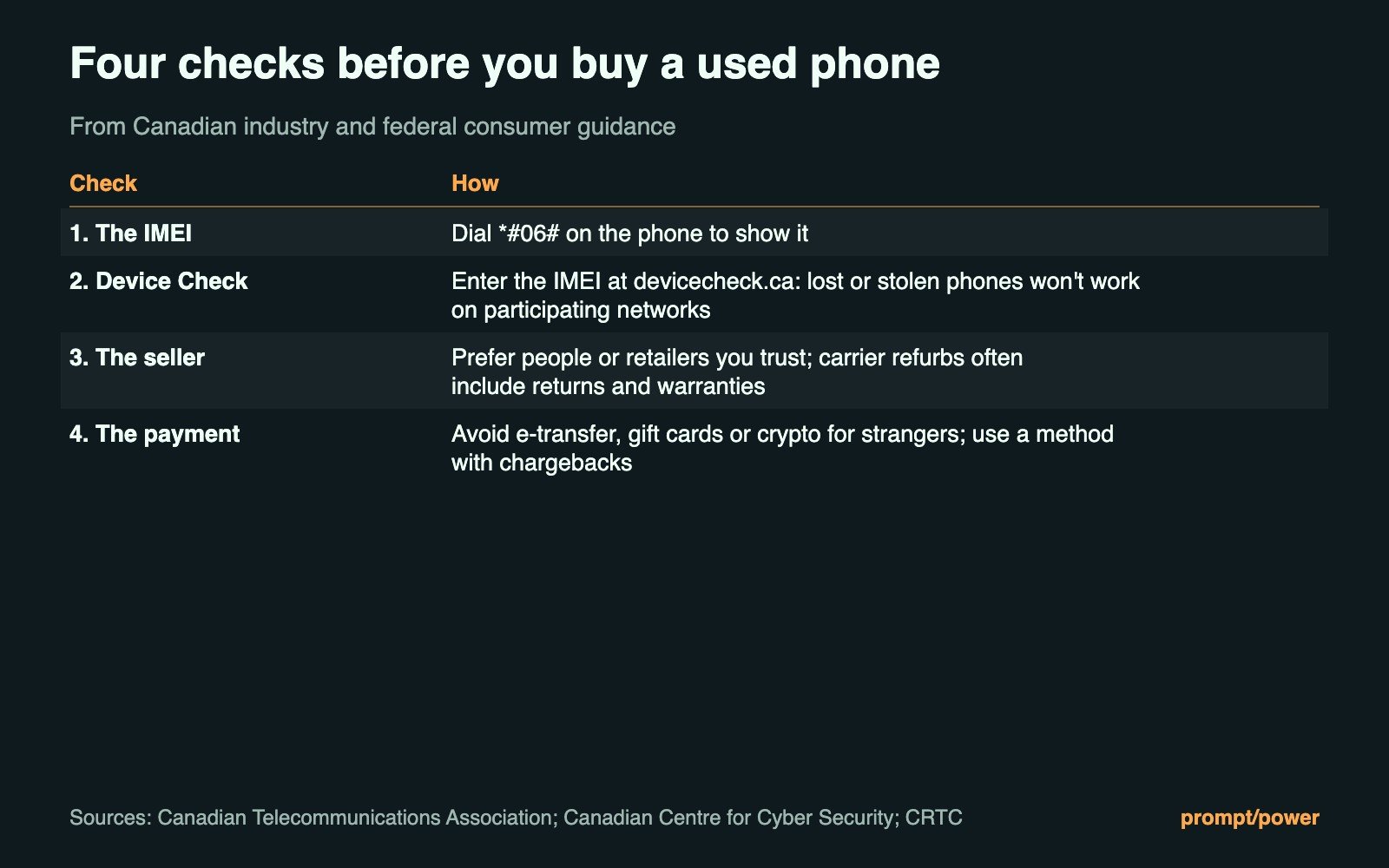
1. Get the IMEI
Every phone has an IMEI, a unique identifying number. On most phones you can display it by dialling *#06# on the keypad, according to the Canadian Telecommunications Association’s guidance for buyers of pre-owned phones. The manufacturer’s website lists other ways to find it. If a seller won’t let you see the IMEI, walk away.
2. Run it through Device Check
Enter the IMEI at devicecheck.ca. The tool shows whether the device has been reported lost or stolen in Canada and added to a blacklist. A blacklisted phone will not work on participating Canadian networks, the association says, which makes it close to useless as a phone even if it powers on. Do the check before money changes hands, ideally while you’re standing with the seller.
3. Choose the seller carefully
The safest route is to buy from people or retailers you know and trust. The association notes that wireless providers often sell refurbished phones with return policies and warranties, which a stranger on a marketplace won’t offer.
If you buy a phone from a provider with a plan, the CRTC’s Wireless Code also applies: devices a provider sells you for its service must be unlocked, and you’re entitled to a trial period of at least 15 days if your contract has an early cancellation fee. Those rights don’t come with a private sale.
4. Pay in a way you can reverse
The Canadian Centre for Cyber Security advises paying with a credit card or another method from a major institution that offers fraud protection or chargebacks, and being wary of anyone who asks for an e-transfer, a gift card or cryptocurrency. For a private sale in person, inspect the phone, run the IMEI check and test it with your SIM before you pay.
Buying in the U.S.?
There’s an equivalent check. CTIA, the U.S. wireless industry association, runs a free Stolen Phone Checker that “uses GSMA Device Check,” the same global database behind Canada’s tool. It’s limited to consumers in the United States and allows five searches a day. A phone reported lost or stolen may have been “blocked from accessing wireless carrier networks,” the site warns, so a clean result is worth more than a seller’s word.
What a blacklist check won’t tell you
Three things to test in person:
- Account locks. A phone can pass the IMEI check and still be tied to the previous owner’s Apple or Google account, which can stop you setting it up. Ask the seller to sign out and erase it in front of you, then make sure it starts at the “Hello” or welcome screen and lets you set it up as new.
- Carrier locks. Phones sold in Canada by providers since December 2017 must be sold unlocked under the CRTC’s Wireless Code, but older or imported phones may not be. Put your own SIM in and make a call.
- Battery health. Both iPhone and many Android phones show battery condition in settings. A cheap phone with a worn battery isn’t cheap for long.
If something goes wrong
If you’ve been scammed, contact your card company right away and report it to the Canadian Anti-Fraud Centre at reportcyberandfraud.canada.ca or 1-888-495-8501. If your own phone is lost or stolen, report it to your carrier.
A few minutes of checking is the difference between a bargain and an expensive paperweight.
Last checked Nov. 24, 2026.
Sources
- Canadian Telecommunications Association, Device Check
- CTIA, Stolen Phone Checker
- Canadian Centre for Cyber Security, Shopping online safely (ITSAP.00.071), October 2026
More from prompt/power: Five Wireless Code rules that protect you · Black Friday scams now look professional · Galaxy S26 and Pixel 10a prices jump in Canada
Researched and drafted with AI tools, fact-checked against primary sources and approved by a human editor before publishing. Prices and dates are as of publication. Our standards →
Sources- stolenphonechecker.org — Stolen Phone Checker
- devicecheck.ca — Device Check
- cyber.gc.ca — Shopping online safely (ITSAP.00.071)

Alicia Loveday is a senior editor at prompt/power and a mom who works where fashion meets AI. She leads Tech & Your Money: what Canadians actually pay for phones, plans and gadgets, and the fine print that changes the bill. When the news needs her elsewhere, she goes. She believes every algorithm should come with a return policy. She also writes for Not An Atlas and The Remote.
All stories by Alicia →Keep reading



Latest from prompt/power
- ChatGPT, Claude, Gemini and Copilot privacy settings: how to stop your chats training AINov 26
- How to turn off AI features on your iPhone, Android phone, Windows PC and in Google and Meta appsNov 26
- TSMC’s US$165-billion Arizona plan: what’s running and what’s still promisedNov 26
- The WHO’s 40-plus rules for AI in health care, and why they matter nowNov 26
- Celestica and Nvidia now share the lead in AI network switches as Ethernet sales more than double, Dell’Oro saysNov 26