Notion AI Credits Start Nov. 2: What the US$20 Business Plan Really Buys
Each Business seat gets 1,500 Standard and 500 Select credits a month. Notion's own per-task figures show that is about 300 simple jobs on Auto, or roughly 10 if you pick Claude Opus 5.5.

On Nov. 2, every existing Notion Business and Enterprise workspace switches to a credit system for Notion AI: each seat gets 1,500 Standard credits and 500 Select credits a month, which reset monthly and don’t roll over. New workspaces have been on it since Oct. 19. The Business plan is listed at US$20 per member per month (about CA$28 or £15), and extra credits cost US$10 per 1,000. On Dec. 1, AI Meeting Notes starts drawing from the same Standard allowance. Using Notion’s own per-task estimates, those 2,000 credits buy roughly 300 simple jobs if you let Notion pick the model, or about 10 if you insist on Claude Opus 5.5.
That gap between the two pools is the part of the change that matters most, and it isn’t in the announcement. It’s in the help center.
Notion AI credits: what changes on Nov. 2
Notion co-founder Akshay Kothari set out the new system in an Oct. 19 blog post. Business and Enterprise seats include 1,500 Standard and 500 Select credits each month. “The vast majority of users are unlikely to run out of monthly credits,” the post says. Existing customers move over on Nov. 2, and admins get an email with details.
Enterprise and annual customers mid-contract should read one line closely. Workspaces that haven’t renewed still move on Nov. 2 “with the same Standard and Select credits as everyone else,” but credits are then set by plan at renewal, and Notion says account teams will explain the details.
The post also makes performance claims we can’t check: that Notion’s Auto model router delivers results similar to Opus 5.5 and Astra at about 90% lower average cost across more than 20 use cases, and that “Notion Agents can now work on a single task for more than 24 hours, up from five minutes.” Treat those as Notion’s numbers.
Standard vs Select credits, in Notion’s words
Notion’s help page on credits draws the line this way: “Standard credits cover work where Notion picks the model.” Select credits “cover work where you pick a model yourself, or use a Custom Agent you own.”
The rules that follow are strict. Per the credit management page, the two allowances reset monthly, don’t roll over, can’t be combined and can’t be transferred between members. Leftover Select credits can’t cover Standard work. Run out of Select and Notion’s advice is to switch the agent back to Auto.
Then there’s a third currency. “Notion credits” (no adjective) are a separate, paid, workspace-wide pool that admins buy. They fund Custom Agents, Workers, high-consumption models and overflow once a member’s included credits are gone, if the admin allows it.
What 2,000 Notion credits a month buys: our estimate
Notion does publish per-task figures, on its manage-your-credits page, comparing Auto with Opus 5.5. We divided each member’s allowance by them. Notion warns that actual use varies; a long, messy email thread costs more than a short one.
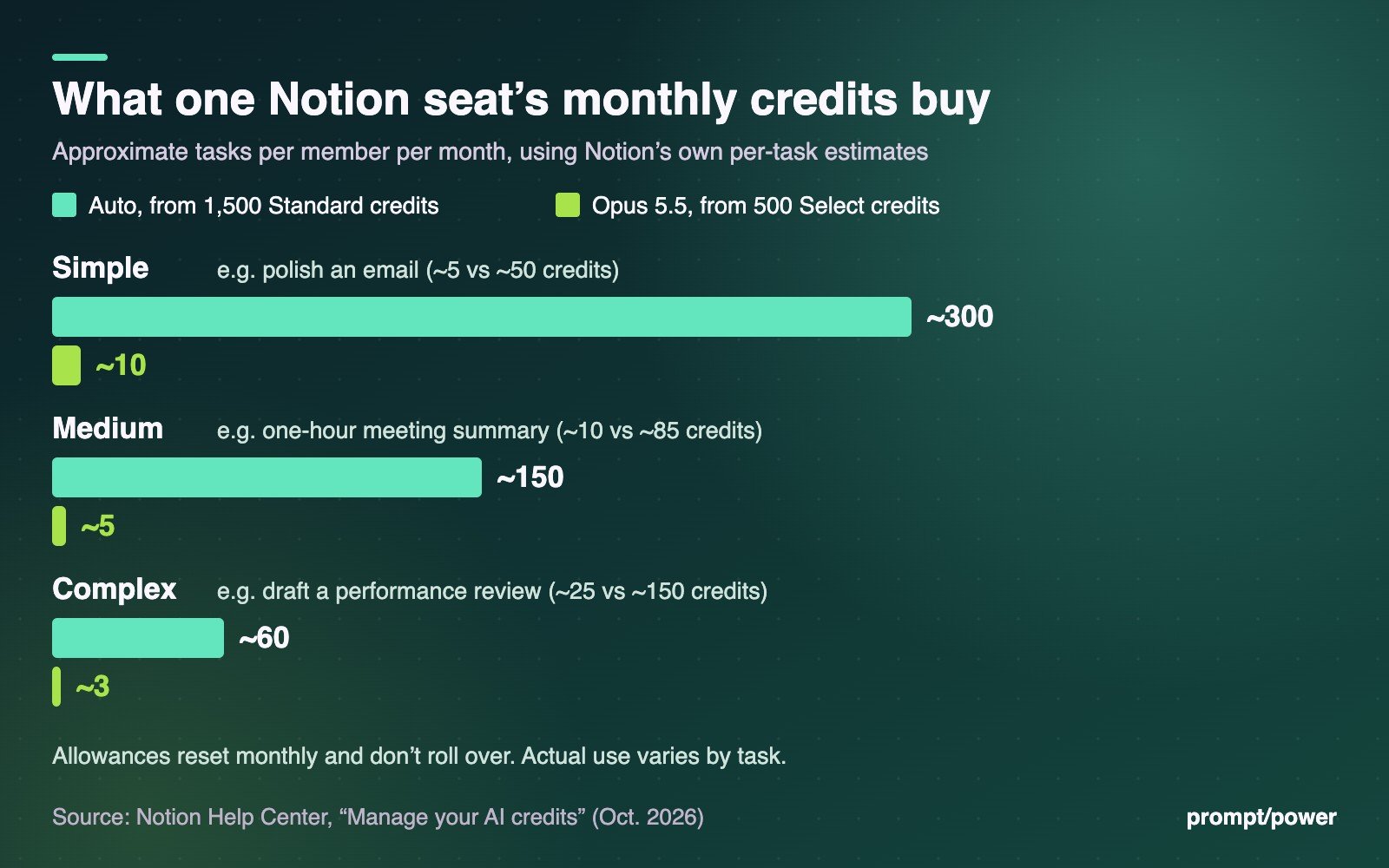
| Task type (Notion’s examples) | Auto credits | Tasks from 1,500 Standard | Opus 5.5 credits | Tasks from 500 Select |
|---|---|---|---|---|
| Simple: polish an email, translate a document | ~5 | ~300 | ~50 | ~10 |
| Medium: write a work report, summarize a one-hour meeting | ~10 | ~150 | ~85 | ~5 |
| Complex: build and configure a database, draft a performance review | ~25 | ~60 | ~150 | ~3 |
Read the right-hand column again. A member who prefers to choose Opus 5.5 for complex work gets about three such tasks a month before the Select pool is empty. The Standard pool, by contrast, is generous for typical use.
A worked month for a fairly busy Business seat, all on Auto: two simple edits each working day (about 22 days, so 44 tasks, roughly 220 credits), ten medium reports (about 100), and from Dec. 1 a weekly one-hour meeting transcribed and summarized, which Notion estimates at about 10 Standard credits each (about 40). That’s around 360 of 1,500. Even doubled, it fits.
Overflow is cheap per task. At US$10 per 1,000 Notion credits, a complex Opus 5.5 job at about 150 credits works out to roughly US$1.50 (about CA$2.11), and a simple Auto task to about five cents. What we can’t estimate is a 24-hour agent run: Notion publishes no credit figure for one.
Notion Business plan price: US, Canada and UK pages checked
We checked Notion’s main pricing page and its UK English page on Oct. 20. Both list prices in US dollars, and the UK page says so outright: “Price in USD.” Neither shows a CA$ or £ figure, and neither mentions VAT or sales tax. We found no separate Canadian page.
- Free: US$0, with Notion AI as a limited trial.
- Plus: US$10 per member per month (about CA$14 / £7.50), also a limited AI trial.
- Business: US$20 per member per month (about CA$28 / £15). Includes AI Meeting Notes and the new monthly credits.
- Enterprise: custom pricing.
The pricing page offers a monthly/yearly toggle with “Save up to 20% with yearly,” but the text we retrieved shows one price per plan, so confirm which billing period the US$20 reflects at checkout. Canadian and British buyers pay in US dollars, so card foreign-exchange fees apply on top.
One oddity for admins: the credits help page lists monthly add-on credits at “$10 per 1,000 credits” and annual credits at “$13 per 1,000 credits.” An annual bundle costing more per credit runs against how SaaS discounts usually work. Ask Notion’s sales team what that figure covers before committing.
How to check and manage your Notion AI credits
- See your own balance: go to Settings → Notion AI → Usage. It shows Standard and Select credits remaining and when they reset. Notion Agent chat also warns you when you’re low.
- Admins, track paid usage: Settings → Access & billing → Notion credits.
- Admins, decide on overflow: in Settings → Notion AI, the toggle “Allow workspace to use Notion credits after AI limit is reached” lets members keep working on paid credits once their included Standard or Select allowance runs out. Leave it off and features simply pause until the monthly reset.
- Members out of Select credits: switch Notion Agent to Auto to keep going on Standard credits.
- Buying more: add-on credits are available to Business and Enterprise admins; annual credits only on annual plans. Mid-cycle purchases are not prorated, per the help page.
What to do before Nov. 2
- Find your heaviest model-pickers. Anyone who habitually selects a frontier model will feel the 500-credit Select ceiling first.
- Decide on the overflow toggle deliberately. On is convenient; off is a hard budget.
- Audit Custom Agents. They draw on Select or paid credits, and Notion’s figures don’t cover long runs.
- Mark Dec. 1. That’s when Meeting Notes start spending Standard credits. Teams that transcribe every call should do the arithmetic now: at about 10 credits an hour, 1,500 credits covers roughly 150 meeting-hours per seat if nothing else touched the pool.
We’ve tracked similar metering moves in our explainer on how Claude Haiku 5.5 pricing changes with prompt length and in our Claude for Google Workspace setup guide. More on our software page.
The number to remember isn’t 2,000. It’s three: the complex Opus 5.5 jobs a Business seat can run each month before Notion asks someone to pay for more.
Researched and drafted with AI tools, fact-checked against primary sources and approved by a human editor before publishing. Prices and dates are as of publication. Our standards →
Sources- notion.com — Oct. 19 blog post
- notion.com — help page on credits
- notion.com — credit management page
- notion.com — main pricing page
- notion.com — UK English page

Alicia Loveday is a senior editor at prompt/power and a mom who works where fashion meets AI. She leads Tech & Your Money: what Canadians actually pay for phones, plans and gadgets, and the fine print that changes the bill. When the news needs her elsewhere, she goes. She believes every algorithm should come with a return policy.
All stories by Alicia →Keep reading




Latest from prompt/power
- Nvidia beats its own forecast with US$115.8 billion, then guides margins lowerNov 18
- Apple, the NSA and Chase: what each says broke in a week of outagesNov 18
- ChatGPT for Healthcare now has agents that click through hospital software. The fine print is all AmericanNov 17
- ChatGPT Wallet lets an AI agent pay for you. Here’s who can use it, and why Canada and the U.K. waitNov 17
- AntiFox: attackers are using an AI pentest agent to steal AWS secrets. Six checks to runNov 17