
GPT-6 Comes to Free ChatGPT: What Luna and ‘Intelligent UI’ Change
Ask ChatGPT how to split a restaurant bill four ways with one person skipping wine, and the answer may no longer be a paragraph. It can be a small working calculator, built on the spot, with fields you fill in and a total that updates as you type. That is the pitch behind GPT-6 with “Intelligent UI,” which OpenAI announced on Oct. 7. Paying subscribers got it that day. Free and Go users start getting it on Oct. 8.
OpenAI says more than 1.2 billion people use ChatGPT every week, a figure that is the company’s own. For anyone using the Chat tab, the model underneath is changing at the same time, and the free version runs on a different one from the paid version. Here is who gets what, what the interactive answers actually do, and how to turn them down if you would rather read.
GPT-6 in ChatGPT: who gets Sol, who gets Luna
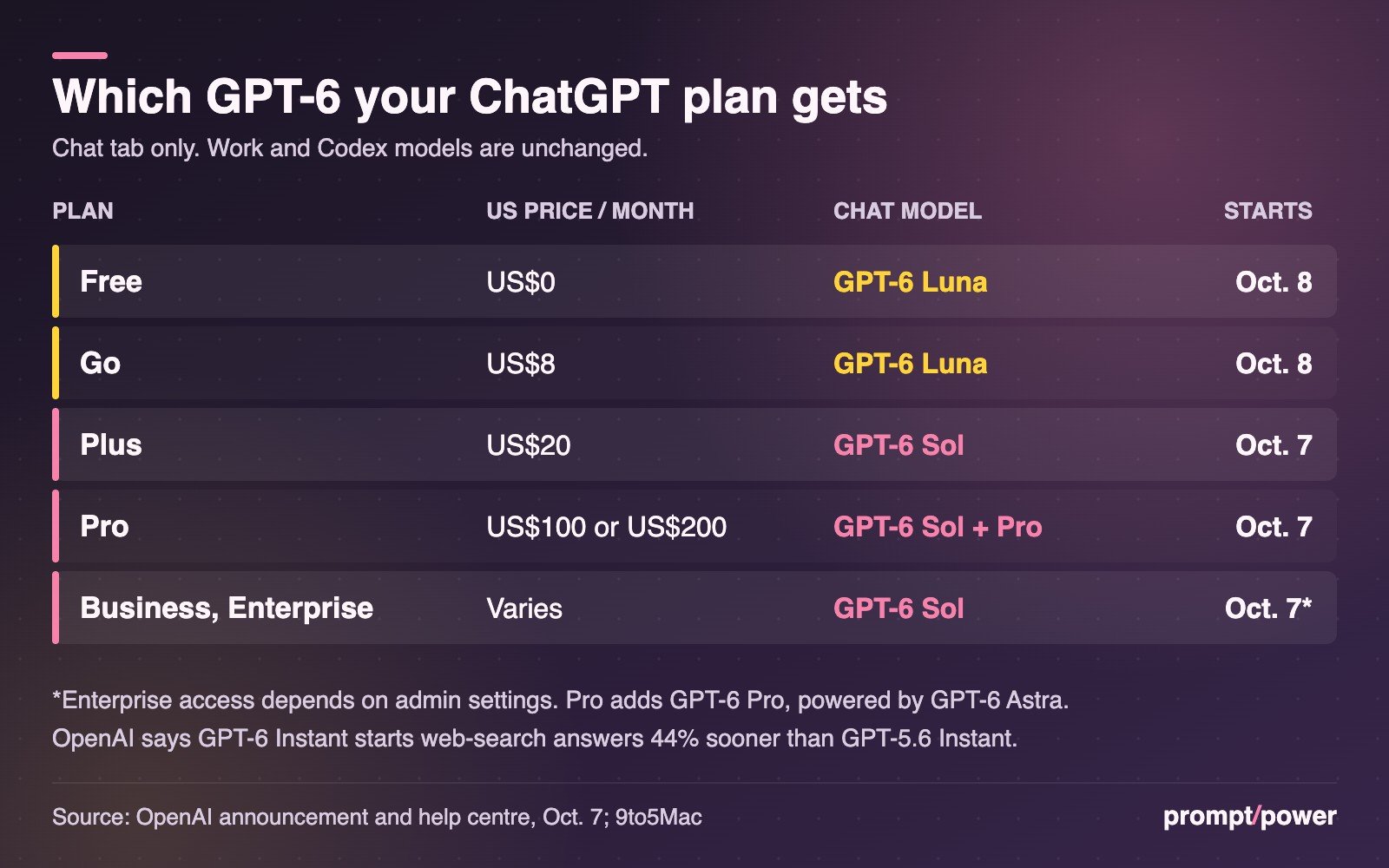
OpenAI is shipping two GPT-6 models into ChatGPT’s Chat tab. GPT-6 Sol powers it for Plus, Pro, Business and Enterprise accounts. GPT-6 Luna powers it for Free and Go. OpenAI describes both as “tuned for everyday conversation,” and the rollout is global, with Enterprise access depending on what a workplace administrator allows.
The update is narrower than the name suggests. It applies only to the Chat tab; as MacRumors noted, the models behind ChatGPT’s Work and Codex modes are not changing. Those already run GPT-6.1 Sol and GPT-6 Astra for paid users, the pair we covered when OpenAI shelved its next Astra and shipped Sol instead.
| Plan | Monthly price (US) | Chat model | Intelligent UI from |
|---|---|---|---|
| Free | US$0 | GPT-6 Luna | Oct. 8 |
| Go | US$8 (about CA$11) | GPT-6 Luna | Oct. 8 |
| Plus | US$20 (about CA$28) | GPT-6 Sol | Oct. 7 |
| Pro | US$100 or US$200 (about CA$139 or CA$278) | GPT-6 Sol, plus GPT-6 Pro | Oct. 7 |
| Business, Enterprise | Varies | GPT-6 Sol | Oct. 7, subject to admin |
Prices are OpenAI’s US list prices: Go at US$8 per its January launch post, Plus at US$20 per 9to5Mac, and the two Pro tiers as listed in OpenAI’s help centre. OpenAI says Go pricing “is localized in some markets,” so what you see at a Canadian checkout may differ from our conversions.
One wrinkle for anyone checking the fine print on Oct. 8. That help-centre article, updated around the launch, still says “Free and Go use GPT-5.6 Luna” and that Luna “is becoming the default model” for those plans. The announcement says GPT-6 Luna. Our read is that the support page has not caught up with a rollout that, by OpenAI’s own description, begins on Oct. 8 and arrives in stages, so a free account may not see the change immediately.
What Intelligent UI actually does to an answer
OpenAI says ChatGPT can now answer with graphics, tappable buttons, forms, charts and interactive tools, and that the model picks the format to suit the question. You do not need a special prompt. Plain-text answers still happen when a visual would add nothing, and the company says it trained the model to make that call.
The examples in OpenAI’s post fall into three groups:
- Everyday planning: a Sunday roast schedule, a capsule wardrobe, a road trip with its stops plotted on a map.
- Learning: explainers for the central limit theorem, GDP and the Monty Hall problem in which you change the inputs and step through the result.
- Small custom tools: a bill splitter, a retirement savings calculator and a retro game you can play inside the conversation.
MacRumors adds a recipe widget that rescales quantities for the number of guests, checklists and multiple-choice follow-up questions. OpenAI’s showcase demo is a seven-speed bicycle broken into tabs for frame, wheels, drivetrain, brakes and cockpit.
Under the hood, OpenAI says it built a library of native components that can stream, plus a compiler that renders the interface progressively while the model is still generating. In practice that means the tool assembles itself on screen rather than appearing all at once at the end.
“Instead of people adapting to software, software will adapt to people.” OpenAI, announcing GPT-6 and Intelligent UI
There are limits. Intelligent UI works with GPT-6 from the Instant setting up to Extra High, according to the help centre, but not at the Pro setting, which runs on GPT-6 Astra. It has no separate usage quota. And these tools live inside ChatGPT; RuntimeWire points out that OpenAI does not describe them as standalone apps you can publish or share elsewhere.
The 44% faster claim, read carefully
OpenAI’s headline speed figure is that, for questions that need a web search, GPT-6 Instant “starts answering” 44% sooner on average than GPT-5.6 Instant. Two words carry that sentence. “Starts” means time to the first words, not time to a finished answer. GPT-6 can begin responding while it is still thinking, building the reply across partial responses, so the wait you notice shrinks even if the total work does not.
The other word is “Instant.” In OpenAI’s help centre, GPT-6 Sol powers the Instant through Extra High settings on paid plans. The announcement does not say whether Luna, the free model, gets the same 44% gain. Treat the number as a Sol benchmark run by OpenAI on its own tasks until the company says otherwise.
A second claim is harder to check from outside: OpenAI says that in an internal evaluation of everyday agentic tasks, GPT-6 at Extra High begins answering in the same time as GPT-5.6 at Medium while scoring better overall than GPT-5.6 at Extra High. No task list or scores were published with it.
Free vs. paid ChatGPT: where Luna falls short
OpenAI’s marketing treats Sol and Luna as siblings. Its GPT-6 system card, published Oct. 7, is blunter. In the cybersecurity evaluations, it states that “GPT-6 Luna underperformed GPT-6 Sol”: 44.66% against Sol’s 82.62% on one exploit benchmark. A hacking test is not a homework test, but it is the clearest published sign that the free model is a smaller tier, not the same brain on a slower plan.
The system card also says both October models show “significant improvements in factuality” over August’s GPT-5.6 Sol, with one exception it names: claim-level factual errors on fact-heavy prompts. That is the kind of question a polished chart can make look more authoritative than it is.
What free users do keep, per the help centre: “unlimited everyday text chats, subject to abuse-prevention safeguards,” with separate limits on file uploads, image generation, voice and data analysis. Free and Go users can pick Think for harder questions, which runs on Luna rather than Sol. They cannot select the Medium, High, Extra High or Pro levels that Plus and Pro subscribers get on a slider.
Go and Free also remain the tiers where OpenAI tests ads. When it launched Go, OpenAI said tests would start with logged-in adults in the US and that Plus, Pro, Business and Enterprise would stay ad-free; its newer image-generation ad format, which we broke down on Oct. 5, follows the same split.
What to do if you want plain text answers back
- Update the app. On phones, Intelligent UI needs the latest ChatGPT app. OpenAI says the older ChatGPT desktop apps for macOS and Windows do not support it; use the web version or install the newest desktop build through Menu, then Check for Updates.
- Dial the visuals down. On the web, Settings has a toggle called Layout and visuals. Turning it off reduces the interactive elements.
- Check the numbers in any tool it builds. A calculator ChatGPT wrote 10 seconds ago has had no testing beyond the model’s own judgment. For a retirement projection or a mortgage split, rerun the maths in a calculator you trust.
- Know which model you are on. If you are paying for Plus and had “Latest” selected, OpenAI says that choice moves to GPT-6 at the same effort level. An explicit GPT-5.6 Sol selection stays put.
The toggle is not an off switch, though. OpenAI’s help page says that with Layout and visuals turned off, “some visual elements may still appear,” and that the setting “does not switch the entire answer experience to a classic or text-only mode.”

Catherine Crowe covers AI explained for prompt/power: the plain-English guides that break down how the technology works, what the jargon means and what it changes for everyday people. Originally from Canada, she writes from New Zealand.
Keep reading

Latest from prompt/power
- National Medal of Science Goes to Musk, Brin, Huang and Su. Nvidia Pledged US$1BOct 10
- TikTok Placebo Safety Test: New York Says Teens Got a Fake Feed ResetOct 10
- Waymo Takes Its First Loan, US$5 Billion, as Robotaxis Head OverseasOct 10
- Claude Haiku 5.5 Price: 90% Cheaper Until Your Prompt Hits 100K TokensOct 10
- Manus Raises More Than US$500 Million After China Blocked Meta’s DealOct 10
Leave a Reply