
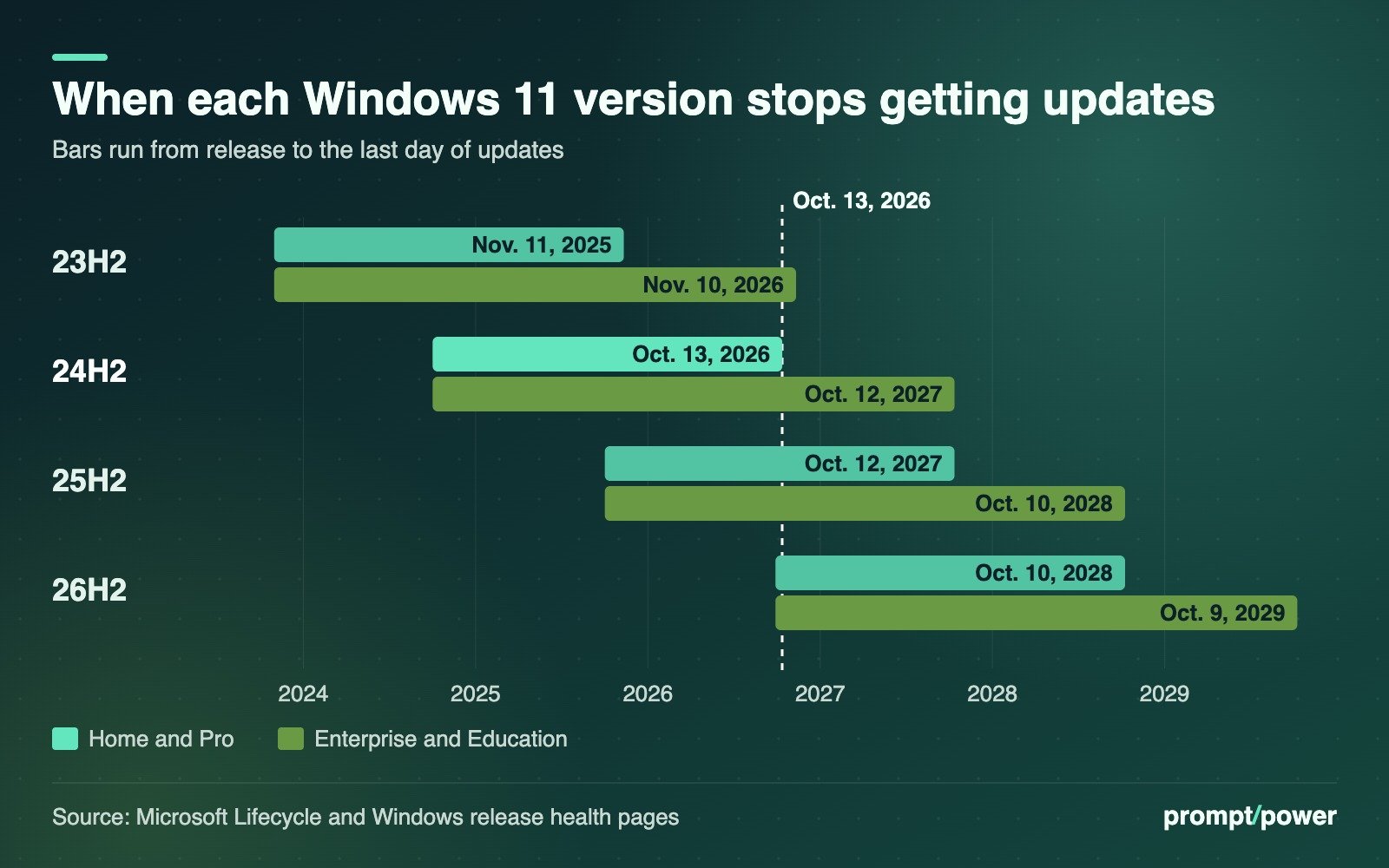
Windows 11 version 24H2 Home and Pro stop getting updates on Tuesday, Oct. 13, 2026. Microsoft’s release health page says those PCs will no longer receive security patches, bug fixes, time zone updates or technical support after that date, which makes the October security update, due out the same day, the last one they get. The fix is free: move to version 25H2 or 26H2 through Windows Update, which on most PCs is a small download and a single restart. The cutoff also covers Pro Education, Pro for Workstations and Windows 11 SE, according to Microsoft’s lifecycle page. Enterprise and Education PCs on 24H2 have another year.
Nothing breaks on Oct. 14. Your PC boots, your apps open, your files stay put. What changes is that every security hole found from November onward stays open on your machine.
Which Windows 11 editions lose support on Oct. 13
Microsoft’s own wording on the 24H2 known issues page is blunt:
“Devices running these editions will no longer receive fixes for known issues, time zone updates, technical support, or monthly security and preview updates containing protections from the latest security threats.”
The Home and Pro lifecycle table lists 24H2’s end date as 6:59:59 a.m. Pacific on Oct. 14, which is Microsoft’s way of saying the end of Oct. 13. That policy covers Home, Pro, Pro Education, Pro for Workstations and SE.
Work and school machines run on a longer clock. Microsoft’s release information table gives 24H2 Enterprise and Education until Oct. 12, 2027. The older 23H2 is the one IT departments should be watching now: its Enterprise, Education and IoT Enterprise editions get a final patch in November, and Microsoft’s message center notice, quoted by BleepingComputer on Oct. 12, says “The November 2026 Windows security update will be the last update available for these editions.” The Enterprise and Education lifecycle page puts that cutoff at Nov. 11 Pacific time, so Patch Tuesday on Nov. 10 is the last one.
Check your Windows 11 version in 30 seconds
- Open Settings > System > About. Or press Windows key + R, type ms-settings:about and press Enter, a shortcut Notebookcheck’s guide recommends.
- Scroll to Windows specifications. Read the Edition line (Home, Pro, Enterprise) and the Version line.
- If Version says 25H2 or 26H2, you are done. If it says 24H2 and the edition is Home or Pro, keep reading.
The OS build number on the same screen is a quick cross-check. Per Microsoft’s release table, 24H2 builds start with 26100, 25H2 with 26200 and 26H2 with 26300. Home and Pro support for 25H2 runs to Oct. 12, 2027, and 26H2 to Oct. 10, 2028.
One oddity: some PCs bought in 2026 run version 26H1. That release “is scoped to support new devices that started coming to market in early 2026,” Microsoft says, and it is not offered as an update to older machines. If yours says 26H1, its Home and Pro support runs into March 2028 and you can ignore this deadline.
How to upgrade from 24H2 to 25H2 or 26H2
This is not the hour-long reinstall of the Windows 10 days. The three versions share a servicing base, and Microsoft’s 26H2 update history page says many eligible PCs need only “a small enablement package” with a “single restart.” John Cable, who runs Windows servicing and delivery at Microsoft, called the install “similar to a monthly update,” BetaNews reported.
- Go to Settings > Windows Update and select Check for updates.
- If your PC is ready, an option reading Download and install Windows 11, version 26H2 appears, according to BleepingComputer. Select it.
- Not offered? On the same page, turn on Get the latest updates as soon as they’re available. Microsoft’s support page says this puts your device first in line for feature updates, and 26H2 is rolling out in phases to PCs with that toggle on. Security updates keep arriving on their normal schedule either way.
- To control when the restart happens, set your working hours under Settings > Windows Update > Advanced options > Active hours.
Many home users will find this has already happened. Microsoft has been moving unmanaged personal PCs to 25H2 automatically, and widened that to all such PCs in April, Notebookcheck reports. Our advice, if you get the choice: take 26H2. It buys you a year more runway than 25H2 for the same single restart.
Windows Update won’t offer the upgrade? Look for a safeguard hold
When Microsoft knows a driver, app or piece of hardware clashes with a new version, it holds the upgrade back on affected PCs. Its support article on safeguard holds shows the message you see instead, which says there is “nothing that requires your attention at the moment,” alongside a Learn more link that names the issue blocking you.
The 24H2 status page currently lists one open, confirmed problem: apps that rely on Windows for AC-3 (Dolby Digital) audio decoding “might close unexpectedly,” traced to the Sept. 22 preview update KB5124010 and last updated Oct. 2. Two others, a black screen after sign-in and USB audio devices failing to start, are marked mitigated.
What to try, in order:
- Install pending driver updates under Settings > Windows Update > Advanced options > Optional updates, then check again.
- Watch the release health page; Microsoft lifts holds once a fix ships, without a public timetable.
- Do not force it. Notebookcheck warns that bypassing a hold with the Windows Update Assistant risks installing the exact bug the hold exists to prevent.
You can delay updates for up to 35 days under Settings > Windows Update > Pause updates, but after Oct. 13 a paused 24H2 PC is simply a PC without security fixes. The pause makes sense only for a day or two around a deadline at work.
Windows 11 SE has nowhere to go
Windows 11 SE, the locked-down edition Microsoft built for cheap classroom laptops, ends with 24H2. There is no 25H2 for it. Microsoft’s SE overview page says support “will end in October 2026” and adds: “While your device will continue to work, we recommend transitioning to a device that supports another edition of Windows 11.” Notebookcheck notes there is no free path to that transition. If your child brings home a school-issued SE laptop, the question belongs with the school. If you are shopping for the replacement yourself, our guide to what matters in a new PC still holds: buy RAM before you buy TOPS.
What the last 24H2 update adds anyway
The parting gift is a decent one, because the same October package goes to 24H2, 25H2 and 26H2. Windows Central’s Mauro Huculak lists the changes, which arrive gradually through Microsoft’s controlled feature rollout:
- Copilot key remap: “Right control” and “Context menu” join the options under Settings > Bluetooth & devices > Keyboard > Customize Copilot key on keyboard.
- PDF previews: File Explorer’s preview pane shows PDFs automatically, and downloaded HTML files after you accept a warning.
- Wi-Fi in recovery mode: the Windows Recovery Environment can reuse your saved Wi-Fi networks, which matters when a broken PC needs to download its own fix.
- Touchpad edge scrolling: new one-finger scrolling options under Settings > Bluetooth & devices > Touchpad.
- Open apps maximized: a new switch under Settings > Accessibility > Visual effects.
Windows Central also notes that the update removes the PC-to-PC Migration feature. More software platform changes are in our software coverage, including the next deadline on the calendar, Reddit’s Nov. 13 RSS shutdown.
On an office PC running 24H2 Enterprise, that 26100 build number will keep ticking up every month until Oct. 12, 2027. On a Home laptop that never upgrades, it stops at whatever Microsoft ships on Oct. 13.

David Mensah covers software and platforms for prompt/power: apps, browsers, developer tools and the open web. He firmly believes every "simple" settings menu is hiding a second, worse settings menu.
Keep reading



Latest from prompt/power
- Meta Q3 Earnings Oct. 21: The Capex, Ads and Cash Numbers to WatchOct 21
- Anthropic’s 5% Pledge Is Worth About US$48B. Here’s the Fine PrintOct 21
- Commons AI Study Meets Parliament’s Interpreter Math: 44 Passes in 5 YearsOct 21
- CNN All Access Canada Price Is CA$7.99. Americans Pay About 23% MoreOct 20
- DeepSeek Federal Ban: DHS Order Also Covers Apps Built on Its ModelsOct 20
[…] If you are on Windows 11 Home or Pro 24H2, this is your last update. Both BleepingComputer and Tenable confirm that 24H2 Home and Pro reached end of servicing on Oct. 13, alongside Office 2021 and the final Extended Security Updates for Windows Server 2012 and 2012 R2. We walked through the upgrade in our guide to the Windows 11 24H2 support deadline. […]